

Integrate PAY in Your Afosto Webshop

Follow the steps below to integrate Pay. into your Afosto webshop:
- Create an Account with Pay.
Use AFOSTO as the partner code to take advantage of special discounted rates.
-
Activate the payment methods you want to use (all available payment methods within Pay.)
-
Grant Afosto access to your Pay. account for support purposes. This can be easily turned on or off. (see here how to grant access)
-
Retrieve the following values from your Pay. account (see here where to find them):
-
API token
-
Service ID
-
Log in op de Afosto webshop omgeving
-
Ga naar "Betaalmethodes"
-
Zoek "Pay.nl" in de lijst en klik deze open
-
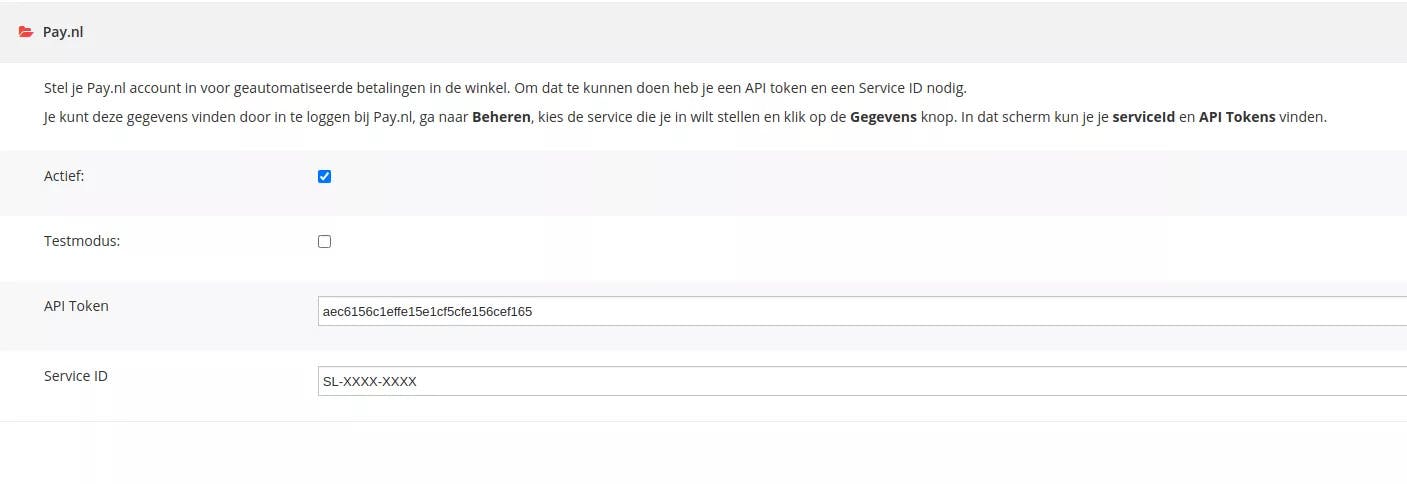
Vink "Actief" aan en eventueel "Testmodus" om te testen of de betaalmethodes terugkomen en werken in je webshop
-
Voer de API token en het Service ID in
-
Save the settings
-
You can now select the payment methods. Note that only the payment methods activated in your PAY. account will appear.
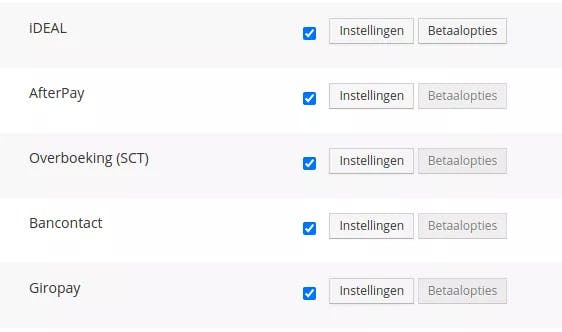
- Save the settings and test whether the payment methods appear correctly in the webshop checkout.
About Afosto
Till, webshop, bol and Kaufland on one stock.