

Afosto CMS - Apps - Automatisch producten koppelen (Up-sell, Cross-sell, Addon, Impuls)
Adding Additional Products
The types of additional products in Afosto are:
-
Additional Products
-
Upsell Products
-
Impulse Sale Products
-
Add-on Products
These can be added in two ways in Afosto:
-
Manually on each product form
-
Via a batch job
This guide explains how to set up additional products using a batch job. Afosto has developed a plugin to assist with this. The plugin allows you to link a specification (filled with the EAN or SKU of the product to be linked) to one of the product relationships. You can easily populate these specifications using a batch import.
Note: This functionality is available through a plugin. Only Afosto and official partners can activate plugins. Using plugins may incur additional costs.
Procedure
Once the plugin is activated and opened, you will find the following settings:
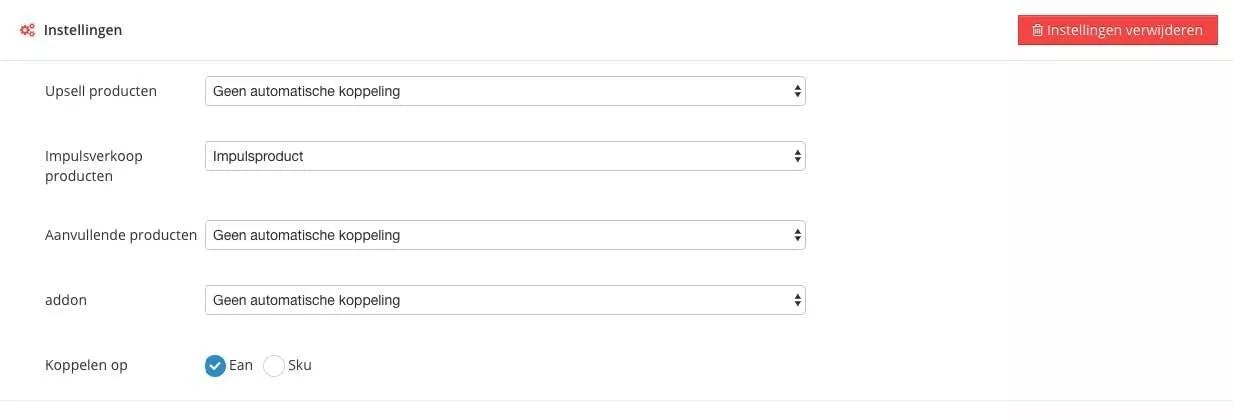
In the settings, you can specify which specification should be linked to which product relationship. In the example above, we use the specification ‘Impulse Product’ for the relationship ‘Impulse Sale Products’.
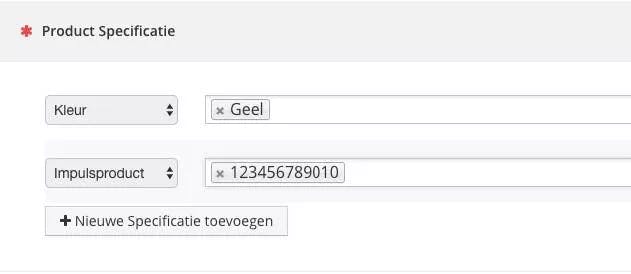
The specification must be created before it becomes available in the overview. The image below shows how the specification should look.
As the final plugin setting, you can choose whether to use the EAN or the SKU as the specification for a product. This choice applies to all settings.
Once the plugin is configured correctly, you can update the specifications you just linked using the batch job: Update Product Specifications.
About Afosto
Till, webshop, bol and Kaufland on one stock.
Related documentation
Loyalty Campaigns
Beheer loyalty campagnes op je kassa, webshop en instore schermen met Afosto
Afosto CMS - Apps - Filter sorting
You can read how to adjust the sorting of filters per page in the Afosto CMS here.
Image Importer
On this page we explain how to set up app messaging for afosto.io
On this page we explain how to set up app messaging for afosto.io