

AVIF vs WebP: File Size, Quality and Browser Support
AVIF vs WebP, tested: file size at the same quality, lossless, HDR, the WebP max size of 16,383 px and browser support, and which format to use when.
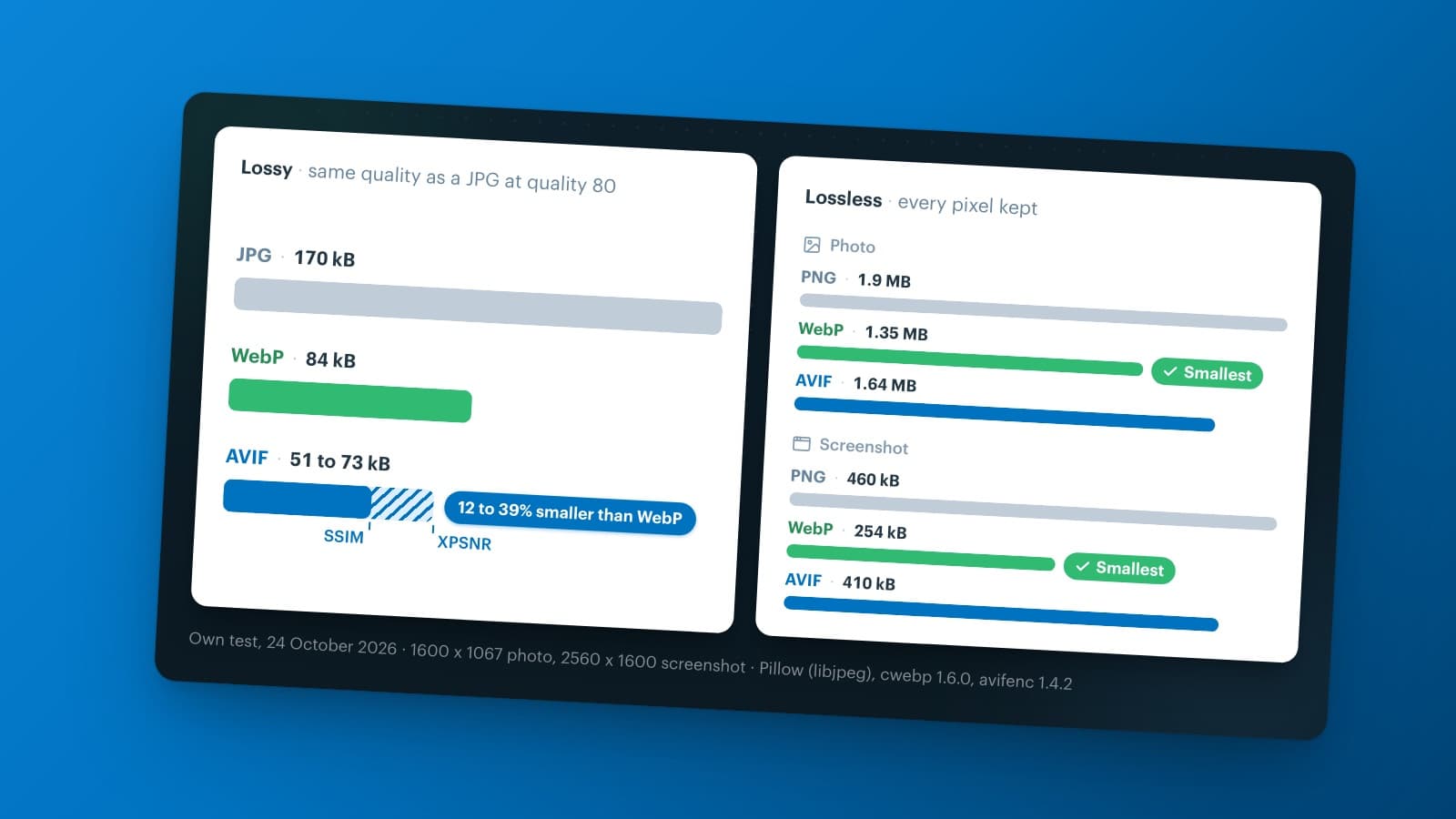
AVIF makes smaller image files than WebP at the same quality, and it supports HDR and 10- and 12-bit color. WebP encodes faster, makes smaller lossless files and works in slightly more browsers. So in the AVIF vs WebP choice, AVIF with a WebP or JPG fallback suits photos best, while lossless WebP suits screenshots, logos and graphics.
We tested both formats on the same photo and on a screenshot, looked up the maximum image size in each specification and checked browser support in October 2026. New to WebP itself? Read what is a WebP file first.
AVIF vs WebP at a glance
| AVIF | WebP | |
|---|---|---|
| Introduced | 2019, Alliance for Open Media | 2010, Google |
| Based on | the AV1 video codec | the VP8 video codec |
| Lossy compression | yes, smallest in our test | yes |
| Lossless compression | yes | yes, smallest in our test |
| Color depth | 8, 10 or 12 bits | 8 bits |
| HDR and wide color | yes | no |
| Transparency and animation | yes | yes |
| Largest single image | 8,192 x 4,352 px (Baseline), larger as tiles | 16,383 x 16,383 px |
| Browser support (September 2026) | 96.35% | 97.18% |
| Encoding speed | slower | faster |
What is an AVIF file?
An AVIF file (.avif) is an image in the AV1 Image File Format. The AVIF specification comes from the Alliance for Open Media, the group of tech companies behind the AV1 video codec, and version 1.0 appeared in February 2019. An AVIF file holds one or more images compressed with AV1, so one format covers photos, transparent images and animations. The AVIF file format is royalty-free, and its MIME type is image/avif.
WebP is nine years older and grew out of Google's VP8 video codec. That codec is the main difference between AVIF and WebP: both formats make images on the web smaller, but AVIF builds on a newer and more efficient one.
How to open or convert an AVIF file
Every current browser opens an AVIF file: drag it into a Chrome, Edge, Firefox or Safari window. To turn it into a JPG or PNG, use Squoosh, a free Google tool that runs in your browser, or an image editor that supports AVIF. An AVIF is an ordinary image file, so you can view it offline once you've saved it.
AVIF vs WebP size: our compression test
On 24 October 2026, we compressed the same photo of 1600 x 1067 pixels as a JPG, a WebP and an AVIF, each at a range of quality settings. We used free reference tools: libjpeg through Pillow, cwebp 1.6.0 and avifenc 1.4.2. Then we compared every file with the original, using two common yardsticks for image quality: SSIM and XPSNR.
Lossy: AVIF makes the smallest file
To match the quality of a JPG at quality 80 (170 kB), the WebP needed about 84 kB: half the size. The AVIF file size came to 51 to 73 kB, which makes it 12 to 39% smaller than the WebP. How much smaller depends on the yardstick: SSIM rewards the smooth surfaces of AVIF more than XPSNR does. That also explains why published WebP vs AVIF comparisons disagree so much.
At the same file size of 82 kB, the AVIF scored higher than the WebP on both yardsticks. Zoomed in, we saw it too: the AVIF kept more detail in the hair, while the WebP showed blotches on a plain wall.
On real websites, the gap is smaller than in a test. According to the Web Almanac 2024 by HTTP Archive, the median AVIF on the web uses 1.4 bits per pixel, against 1.3 for WebP. The authors suspect that many AVIF encoders now pick a higher quality by default. So check the quality setting of your encoder: AVIF only saves bytes if you let it.
Lossless: WebP wins
Lossless compression keeps every pixel, and here WebP did better. For the photo, lossless WebP came to 1.35 MB and lossless AVIF to 1.64 MB, against 1.9 MB as PNG. For a screenshot of a web app of 2560 x 1600 pixels, the gap grew: WebP 254 kB, AVIF 410 kB and PNG 460 kB. We decoded every lossless file again, and every pixel matched the original.
So for screenshots, logos and images with text, lossless WebP is the better choice. Not sure which kind of compression you need? Read lossy vs lossless image compression.
Encoding speed
AVIF costs more computing time. With the settings from our test, encoding the photo as AVIF took about twice as long as encoding it as WebP: 0.3 against 0.15 seconds on one processor core of our laptop. At the slowest AVIF setting, the same photo took 26 seconds, for a file that was only 6% smaller. For one image, that doesn't matter. For thousands of product photos in several sizes, it does.
Image quality: HDR, color depth and chroma
Lossy WebP always stores an image with 8-bit color, and it keeps the color information at half the resolution in both directions. That scheme has a name, 4:2:0, and Google's WebP FAQ names it as the only option for lossy WebP. In most photos you won't notice, but fine colored details, such as thin red text on a blue background, can look slightly soft. Lossless WebP keeps full color, also at 8 bits per channel.
Does WebP support HDR? No. HDR needs more than 8 bits per color plus HDR color information in the file, and WebP has neither. AVIF supports 8, 10 and 12 bits per color, color at full resolution (4:4:4) and HDR with a wide color range, such as Rec. 2020 and Display P3. You only see that HDR on a screen that supports it, and only in a photo you shot or edited in HDR.
WebP max size and AVIF max resolution
The WebP max size is 16,383 x 16,383 pixels. Google's WebP FAQ gives that limit, and libwebp, the reference encoder, enforces it. The reason lies in the format: lossy WebP stores the width and the height in 14 bits each, and 16,383 is the largest number that fits. The lossless variant could in theory go one pixel further, but libwebp stops both at 16,383.
So the WebP max resolution comes to about 268 megapixels. We tried the limit: cwebp 1.6.0 converts an image of 16,383 pixels wide, and refuses one of 16,384 pixels with the message "Maximum width and height allowed is 16383 pixels." The WebP specification, RFC 9649, also caps the file itself at 4 GiB minus 2 bytes.
Unlike AVIF, WebP has no grid of tiles for still images, so this WebP size limit is a hard one: you have to scale a bigger image down or cut it into separate files.
AVIF goes further. One AV1 image can be up to 65,536 x 65,536 pixels, according to the AVIF specification. But the Baseline profile of that specification limits one image to 8,192 x 4,352 pixels, and the Advanced profile to 16,384 x 8,704, because some decoders may not handle larger images. For anything bigger, AVIF stores a grid of tiles, and the decoder joins them into one image.
In practice, you rarely hit either limit. A 12-megapixel phone photo of 4,032 x 3,024 pixels fits in both formats with room to spare. You run into the WebP limit with wide panoramas, large floor plans or zoomable product images.
AVIF browser support vs WebP
Both formats work in every current major browser. According to Can I use, 96.35% of the browsers in use worldwide support AVIF and 97.18% support WebP (StatCounter data, September 2026). The difference comes from older versions, such as Safari before 16 and Edge before 121.
| Browser | AVIF | WebP |
|---|---|---|
| Chrome (desktop and Android) | from version 85 | yes |
| Microsoft Edge | from version 121 | from version 18 |
| Firefox | from version 93, animated from 113 | from version 65 |
| Safari on Mac | from 16.4, partly from 16.1 | from 14, fully from 16 |
| Safari on iPhone and iPad | from version 16 | from version 14 |
| Samsung Internet | from version 14 | yes |
| Opera | from version 71 | yes |
Is AVIF supported by all browsers? Not quite: just under 4% of the browsers in use can't show it, against just under 3% for WebP. That's why you give AVIF a fallback.
On the web itself, WebP is far more common. The Web Almanac 2024 found that 12% of the images on mobile pages are WebP and 1% are AVIF. AVIF is catching up, though: its share of images grew by 386% in two years, faster than any other format.
How to use AVIF and WebP together
You don't have to pick one format for every visitor. There are two common ways to send AVIF to browsers that support it, and WebP or JPG to the rest.
Option 1: the picture element
In your HTML, you list the formats in order of preference. The browser loads the first one it supports and skips the rest:
<picture>
  <source srcset="sneaker.avif" type="image/avif">
  <source srcset="sneaker.webp" type="image/webp">
  <img src="sneaker.jpg" alt="White sneaker" width="1600" height="1067">
</picture>
This works on any website, but you have to create and store three files for every image, in every size you use.
Option 2: let the server choose
With every image request, the browser tells the server which formats it accepts, in the Accept header. A server or an image CDN reads that header and returns the best format under the same URL. The URL can even end in .jpg while the file is AVIF or WebP. In your browser's developer tools, the Network tab shows which format actually arrived.
Hundreds of product photos: where the real savings are
For an online store, the choice between AVIF and WebP matters less than the step before it. In our test, going from JPG to WebP saved 86 kB on one photo, and going from WebP to AVIF saved another 10 to 33 kB. Product photos often come straight from a camera or a supplier, at a size no screen needs.
Every photo also needs several sizes: a thumbnail on the category page, a large image on the product page. Converting all of those by hand, in two or three formats, doesn't scale.
Afosto built Quicq for this: an image CDN that fetches your original photo once and serves each visitor the right size in a lighter format. You set the size in the URL, for example ?w=400, and all options are in edit images via the URL. Quicq then sends each browser a lighter format it supports, such as WebP, and an optimized JPG to browsers that support none. In our own test on 24 October 2026, a photo of 1600 pixels wide came through as a WebP of 108 kB instead of a JPG of 165 kB.
Your originals stay on your own server, so you don't upload anything again: only the image URL changes. Quicq works independently of your store platform, with guides for Magento, PrestaShop and Afosto webshops, among others.

Hundreds of product photos to keep light? Quicq serves each visitor a lighter format at the right size, while your originals stay as they are. Create a free account and test it on your own images.
AVIF or WebP: which is better?
Neither format wins everywhere. Use this rule of thumb:
- Photos, banners and product photos: AVIF, with WebP or JPG as a fallback. Or just WebP, if you want one format that's quick to make.
- Screenshots, logos, icons and images with text: lossless WebP, or SVG for logos and icons.
- HDR photos: AVIF, because WebP has no HDR.
- Images wider or taller than 16,383 pixels: AVIF, because WebP stops there.
- Thousands of images to convert quickly: WebP, because it encodes faster.
Whichever you pick, the biggest win usually comes from serving every image at the right size in a modern format at all.
Run every channel from one place
Orders, stock, POS and shipping in one system.
Create free accountBook a demoFrequently asked questions
Is AVIF better than WebP?
For lossy photos, usually yes. In our test, AVIF matched the quality of a JPG at quality 80 in a file 12 to 39% smaller than the WebP, and AVIF also supports HDR and 10- and 12-bit color. WebP is the better choice for lossless images such as screenshots and logos, it encodes faster and it works in slightly more browsers. Many sites use both: AVIF first, with WebP or JPG as a fallback.
What is the WebP max size?
A WebP image can be at most 16,383 x 16,383 pixels, according to Google's WebP FAQ, and the WebP specification (RFC 9649) limits the file itself to 4 GiB minus 2 bytes. The reference encoder cwebp refuses anything wider or taller with the message "Maximum width and height allowed is 16383 pixels." For a bigger image, scale it down, split it into several files or use AVIF, which can store a grid of tiles.
Does WebP support HDR?
No. WebP stores 8 bits per color channel, and lossy WebP always uses 8-bit 4:2:0 color, according to Google's WebP FAQ. HDR needs a higher bit depth plus HDR color information in the file. For HDR photos, use AVIF: it supports 10 and 12 bits per color and wide color ranges such as Rec. 2020 and Display P3. You only see the HDR effect on a screen that supports it.
Is AVIF lossless?
AVIF can be lossy or lossless: you choose when you encode the file. Lossless AVIF keeps every pixel, but in our test it made larger files than lossless WebP: 1.64 MB against 1.35 MB for a photo, and 410 kB against 254 kB for a screenshot. So for screenshots, logos and graphics where every pixel counts, lossless WebP is usually the smaller choice.
Is AVIF supported by all browsers?
Almost. The current versions of Chrome, Edge, Firefox, Safari, Samsung Internet and Opera all show AVIF, and according to Can I use, 96.35% of the browsers in use worldwide support it (September 2026). WebP reaches 97.18%. The gap comes from older versions, such as Safari before 16 and Edge before 121. So give AVIF images a WebP or JPG fallback, with the picture element or a server that reads the Accept header.
Can I use AVIF images in WordPress?
Yes. Since version 6.5 from 2024, WordPress lets you upload AVIF images and use them like JPG or PNG, as long as the image library on your server supports AVIF. You can check that under Tools > Site Health > Info > Media Handling. WordPress doesn't convert your existing JPG images to AVIF by itself, so for those you need a conversion plugin or an image CDN.