

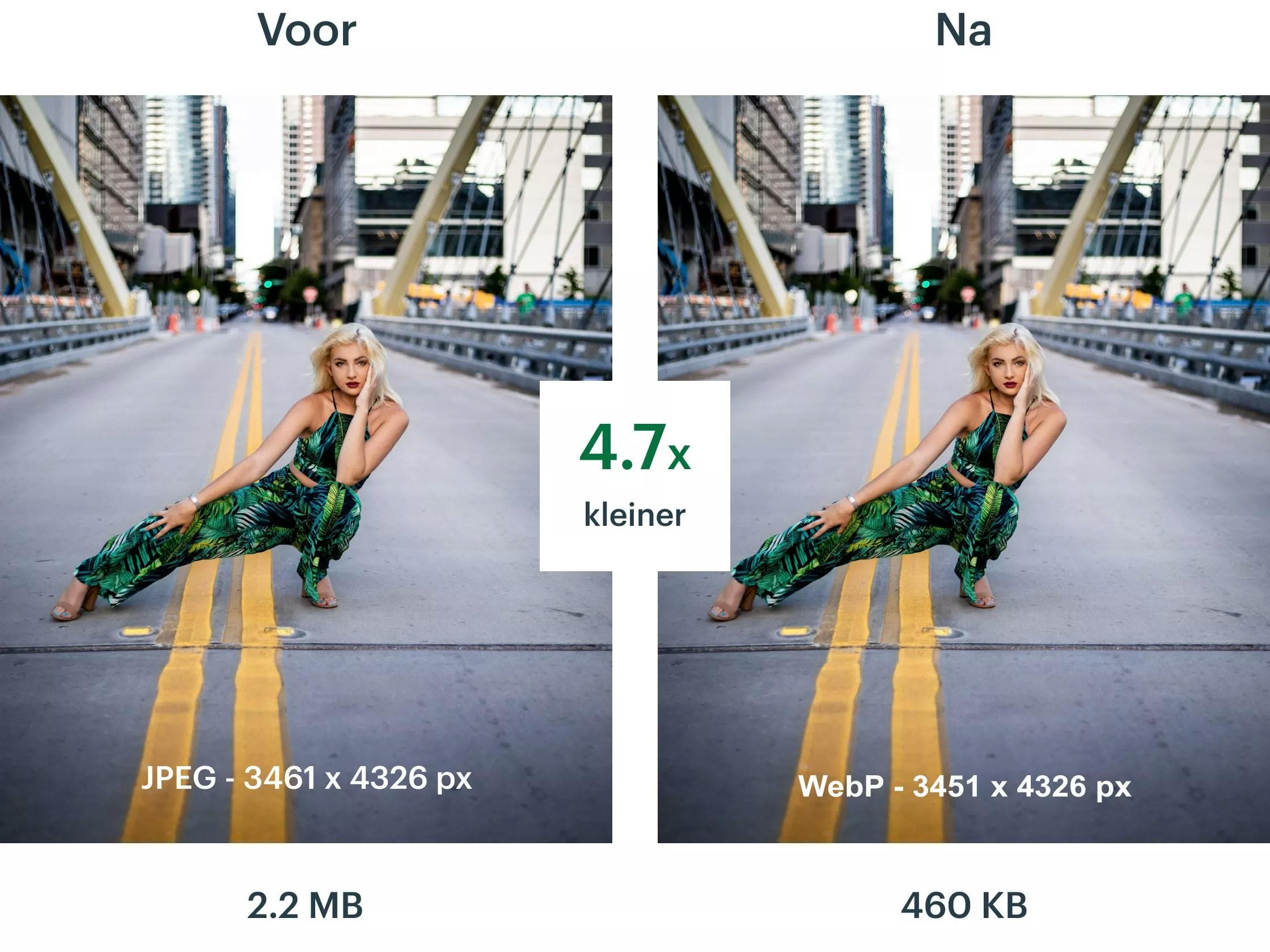
The same photo, 4.7x smaller, with no manual work
Quicq is Afosto's image CDN. It fetches your original image once, turns it into a light WebP or AVIF variant for each visitor and serves it worldwide from a server nearby. No export rounds and no plugins: only your image URL changes.
What is an image CDN?
An image CDN is a Content Delivery Network built specifically for images. It sits between your website and your visitors: it fetches your original image, optimises it and serves the result from a server close to the visitor. You do not have to change your originals; only the image URL now points to the CDN. Quicq works with three building blocks:
Smaller files mean faster pages, and load speed counts towards the user experience and towards the Core Web Vitals that search engines use to judge your site. Optimising images is therefore one of the most direct ways to work on findability and conversion.
One source, no copies
the original stays on your own server or storage, is fetched once and cached for up to six months
Transformations in the URL
width, height, crop, quality and blur are set with parameters like ?w=400&h=400&c=1, with no image editing up front
Optimisation per visitor
every browser gets the lightest format it supports, such as WebP or AVIF, with an optimised JPG as a fallback
How it works
From original to optimised, in four steps
Between the original on your server and the optimised image on your visitor's screen there are four steps. Only the first is up to you.
- Step 1
Set up your CDN
Pick a unique key for your image URLs, for example an abbreviation of your company name. That becomes cdn.quicq.io/your-key. Then you point Quicq to where your current images live: for Afosto, Magento and WordPress it detects that automatically, for other platforms you enter the location yourself.

- Step 2
Original fetched once
On the first request Quicq fetches the original from your server or storage and keeps it for up to six months in its own storage. Every following request is served from there: your server is queried only once per image and you save on data traffic.

- Step 3
Edited and optimised per visitor
First Quicq applies the edits you pass in the URL, such as a width or a crop. Then it picks, per visitor, the lightest format the browser can handle: WebP or AVIF where it can, an optimised JPG where it must. PNG and GIF are converted too where possible.

- Step 4
Served worldwide from cache
The result travels through Google Cloud CDN to your visitor, from one of over a hundred data centres worldwide. The network scales automatically with your traffic, and you decide how long images stay in your visitors' browser cache.

Want to see what it gains you first? The free website check on quicq.io shows, page by page, how much you can save on your images.
Features
More than compression alone
Quicq does more than shrink files: it is also where you manage your image variants, media and storage sources.

Thumbnail in one line
?w=400&h=400

In our example
2.2 MB to 460 KB

Sources
Folder, S3 or upload
Quicq in numbers
What happens the moment Quicq is on
is all the 2.2 MB JPEG from our before/after example at the top still weighs, served as WebP
data centres worldwide: Google Cloud CDN always serves from a location close to your visitor
Quicq keeps your original, so your server is queried only once per image
free to try, without a credit card and without changing your originals
Why fast images are not a detail
On most webshops and websites, images are the largest part of the page weight. Every unnecessary megabyte means more waiting, especially on a mobile network, and load speed counts towards the Core Web Vitals that Google uses to judge your site. Optimising images is therefore one of the most direct ways to work on findability and conversion; with an image CDN it happens automatically instead of file by file.
Afosto uses Quicq itself: every image on afosto.com is served through cdn.quicq.io, with the wanted width as a URL parameter. View the source of any page and you will see URLs in this form:
cdn.quicq.io/afosto-site/product-photo.jpg?w=1200
Want to know more about how it works? The free website check on quicq.io shows, page by page, how much you can save.
FAQ
Frequently asked questions about Quicq and image optimisation
The questions website owners ask us most often before they switch Quicq on.
What is Quicq?
Quicq is Afosto's image optimisation app: an image CDN that fetches your original images, optimises them per visitor and serves them worldwide through Google Cloud CDN. You set a unique key for your URLs (cdn.quicq.io/your-key), point it to where your current images live and route your image URLs to the CDN. From that moment every image is compressed automatically and served in the right format.
What is an image CDN?
An image CDN is a Content Delivery Network specialised in images. It sits between your website and your visitors: it fetches the original from your server, optimises it and serves the result from a server close to the visitor. The difference with an ordinary CDN is the image editing: an image CDN delivers a different variant per request, for example a thumbnail for an overview page and a large size for a product page, based on URL parameters.
Which file formats does Quicq support?
Quicq prefers to serve images as WebP or AVIF, the modern formats that most browsers support. If that is not possible for a visitor, Quicq falls back to an optimised JPG. Images saved in formats that are hard to optimise, such as PNG or GIF, are converted to WebP or JPG where possible.
Does Quicq work with my webshop platform?
Quicq works independently of your platform: all it needs is for your image URLs to be able to point to the CDN. For Afosto, Magento and WordPress, Quicq detects the location of your images automatically during setup; for other platforms you enter that location yourself. There are step-by-step guides for Magento 1, Magento 2, Prestashop and Afosto shops, and you get free help with the integration.
Do I have to change my existing images?
No. Your originals stay on your own server or storage; Quicq fetches them on the first request and keeps them for up to six months in its own storage. You do not have to convert, resize or re-upload anything. By default Quicq does override the cache settings your platform passes; under the advanced settings you can switch that off or set the cache duration yourself.
What does Quicq cost?
Quicq is a separate product with its own plans, apart from the Afosto subscription. You try it 14 days free, without a credit card. Want to know up front what it gains you? Do the free website check on quicq.io: it shows, page by page, how much you can save on your images.
Try Quicq 14 days free on your own site
Create an account, set up your CDN and see the difference on your own product photos. Questions about the integration with your platform? Book a demo and we will take a look with you.