

Lossy vs Lossless Compression: Meaning and Differences
Lossy means data is lost for a smaller file, lossless keeps every bit. See what lossy compression means, a real photo test and when to use which.
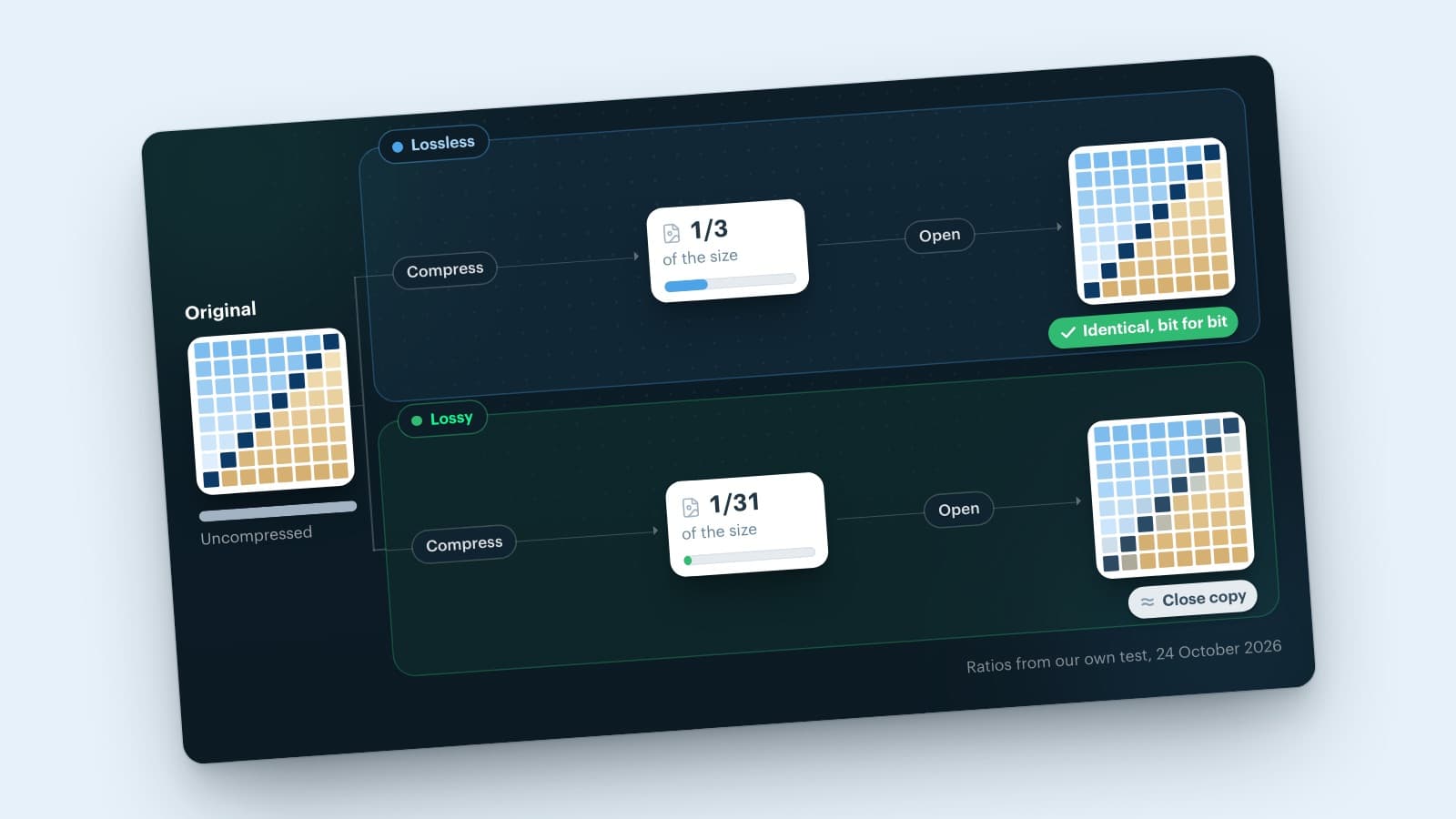
Lossy compression makes a file smaller by permanently removing data you are unlikely to notice. Lossless compression makes a file smaller without losing anything: open it and you get the original back, bit for bit. That is the whole lossy vs lossless compression trade-off: far smaller files, as in JPG and MP3, against perfect quality, as in PNG, FLAC and ZIP.
So which one should you use? For photos on a website, lossy is almost always the better choice. For logos, screenshots, text and files you still want to edit, use lossless. Below you'll find what both terms mean, how they work, what they did to a real photo in our own test, and which file types are lossy or lossless.
Lossy meaning: what does lossy mean?
To define lossy in two words: "with loss". A lossy process loses part of the data along the way, so a lossy file or lossy format stores a close copy of the original instead of an exact one. The opposite is lossless: nothing disappears. That lossy definition holds for images, audio and video alike, and you mostly come across the word in lossy compression.
The Cambridge Dictionary gives this definition of lossy: "involving the loss of data or of electrical energy". That second meaning of lossy comes from electronics: a lossy cable or material wastes part of the energy that passes through it. The adverb is lossily: a photo you compress lossily has lost some of its data for good.
So what does lossy and lossless mean for your files? Lossy: smaller, but not exact. Lossless: exact, but larger.
What is lossy compression? Meaning and definition
Lossy compression shrinks a file by throwing away information that people hardly see or hear. That makes the file far smaller than any lossless method can make it. The catch: the removed data is gone, and you can't restore the original from a lossy file. Common examples are JPG and lossy WebP for images, MP3 and AAC for audio, and H.264 for video.
Lossy image compression such as JPEG works in a few steps. It splits the photo into blocks of 8 by 8 pixels and describes each block as a mix of smooth and fine patterns. Then it rounds off the finest patterns, which your eye barely notices. JPEG usually also stores color in less detail than brightness, because your eyes are more sensitive to light and dark than to color.
The lossy quality setting
Most tools let you choose a quality on a scale up to 100. A lower number means more rounding off, a smaller file and, at some point, visible flaws. In our own test on 24 October 2026, we compressed the same photo of 1600 by 1067 pixels as a JPG at five quality levels:
| Quality | JPG file size |
|---|---|
| 90 | 311 kB |
| 75 | 143 kB |
| 50 | 93 kB |
| 25 | 59 kB |
| 10 | 32 kB |
From quality 90 to 75, the file shrinks by more than half, and even at 100% zoom we saw no difference. At quality 10, you clearly see square blocks and smeared colors when you zoom in. Those flaws are compression artifacts, and they show up first around sharp edges and text.
Saving a lossy file again costs a little more each time
Each time you open, edit and save a JPG, the encoder rounds off the image once more. After many rounds, the quality visibly drops. This effect has a name: generation loss. So keep one original in high quality, and export a new lossy copy from it whenever you need one.
What is lossless compression?
Lossless compression shrinks a file without changing a single bit of its content. When you open the file, the software rebuilds the exact original. ZIP files work this way, and so do PNG images. A text document or a spreadsheet has to come back exactly as it was, so for those, lossless is the only option.
Lossless methods look for patterns and repetition and write them down more efficiently. Picture a row of 200 identical white pixels: instead of storing every pixel, the file says "white, 200 times". PNG adds a few smart filters and then uses DEFLATE, the same method most ZIP files use.
That works well for logos, screenshots and illustrations with large flat areas. A photo contains far fewer exact repetitions, because of noise and fine detail, so lossless saves less there. According to the Web Almanac 2024 by HTTP Archive, a good rule of thumb is that lossless compression halves a file (2:1). For classic lossy formats such as JPEG and MP3, the rule of thumb was 10:1.
Removing metadata, such as the camera model or the GPS location stored in a photo, also makes a file smaller without touching the pixels. That's a useful extra step, but it isn't the same as lossless compression.
Lossy vs lossless compression: the key differences
The difference between lossy and lossless compression comes down to one trade-off: a smaller file against an exact copy.
| Lossy | Lossless | |
|---|---|---|
| Data | partly removed for good | all kept |
| Back to the original? | no, a close copy | yes, bit for bit |
| File size | much smaller | smaller, less so |
| Quality | drops as you compress harder | always identical |
| Saving again | loses a little more | loses nothing |
| Best for | photos, music, video | text, code, logos, screenshots |
| Examples | JPG, MP3, AAC | PNG, FLAC, ZIP |
Lossy vs lossless image compression: one photo, four files
How big is the difference in practice? We took one photo of 1600 by 1067 pixels, the example image from the Quicq documentation, and saved it twice lossless and twice lossy. Uncompressed, the pixels of that photo take up 5.1 MB. Quicq, the image CDN from Afosto, made the lossy versions at its default quality, as well as the five quality levels above. We saved the lossless versions with the free tools Pillow and cwebp.
| File | Compression | Size | Pixels changed |
|---|---|---|---|
| PNG | lossless | 1.7 MB | 0% |
| WebP | lossless | 1.1 MB | 0% |
| JPG | lossy | 165 kB | 78% |
| WebP | lossy | 108 kB | 99% |
The lossy JPG is ten times smaller than the lossless PNG. In both lossy files, most pixels differ from the original, but only a little: on average by about 2 of the 255 possible levels per color. You can't see that on a screen. In both lossless files, every pixel is exactly the same.
For a website, that difference counts. According to the Web Almanac 2024, images are the largest resource type on homepages, video aside, and the median mobile homepage loads 900 KB of images. Smaller images load faster, especially on a mobile connection, and a faster page helps your visitors and your SEO.
Which file types are lossy or lossless?
Lossy file types always remove some data, lossless file types never do, and modern formats let you choose. These are the image file types you'll come across most:
| Format | Compression | Good for |
|---|---|---|
| JPG (JPEG) | lossy | photos |
| PNG | lossless | logos, screenshots, transparency |
| GIF | lossless, up to 256 colors | simple animations |
| WebP | lossy or lossless | photos and graphics on websites |
| AVIF | lossy or lossless | photos on modern websites |
| SVG | no pixels: shapes as code | logos and icons |
Is JPEG lossy or lossless?
JPEG is lossy. It's a lossy compression technique by design: every time a camera, phone or editor saves a photo as a JPG, it removes some fine detail. At the high quality settings cameras use, you won't see that in your pictures. But a JPG is never a perfect copy of what the camera captured, and each edit you save again costs a little more. So save work in progress as PNG or TIFF, and export a JPG only at the end.
Is GIF lossy or lossless?
GIF compresses lossless, with a method called LZW. But a GIF can hold at most 256 colors. When you turn a photo with thousands of colors into a GIF, the converter replaces most of them with the nearest color in that palette. So the GIF compression is lossless, but the conversion to GIF often isn't.
Then what's the lossy GIF meaning? A lossy GIF is a GIF made with an encoder that changes pixels slightly on purpose, so the file compresses better. The free tool gifsicle does this with its --lossy option, at the cost of some noise and artifacts.
WebP: lossless vs lossy
WebP can do both, and you choose when you save the file. According to Google, a lossy WebP is 25 to 34% smaller than a comparable JPG, and a lossless WebP is 26% smaller than a PNG. In our own test, the lossless WebP came out 36% smaller than the PNG.

Want to know how to open a WebP file or convert it to JPG? Read what is a WebP file. For the newer AVIF format, see AVIF vs WebP.
When to use lossy or lossless compression
Lossless vs lossy compression is not a contest: neither wins in every case. It depends on what's in the file and what you'll do with it next. The image format guide on MDN puts it simply: prefer lossless for screenshots, diagrams, logos and line art, because blurring and colored fringes around text and sharp edges are very visible. Photos can usually take lossy compression.
Use lossy compression for:
- photos on your website, in your online store and in newsletters;
- product photos and banners, where loading speed counts;
- music and video you stream or share.
Use lossless compression for:
- logos, icons, screenshots and images with text;
- graphics with transparent areas, as PNG or lossless WebP;
- your originals and files you still want to edit;
- documents, spreadsheets, code and backups, where every bit counts.
A practical rule for lossy images: keep one original in the best quality you have, and export a lossy copy from it for every place you use it. Lower the quality step by step, and stop as soon as you see a difference at 100% zoom.
Lossy compression for hundreds of product photos
An online store often has hundreds or thousands of product photos, each in several sizes: a thumbnail on the category page, a large image on the product page. Compressing all of them by hand, for every size and format, doesn't scale. And every time someone saves an already compressed JPG again, it loses a bit more.
What works better: keep your originals as they are, and let every visitor get a lossy copy at the size they need. Afosto built Quicq for this: an image CDN that fetches your original photo once and keeps it for up to six months. It applies the size from the URL, for example ?w=400, and then compresses the image for each visitor: WebP where the browser supports it, an optimized JPG where it doesn't.
You can also set the quality yourself with ?q=. All options are in edit images via the URL. Your originals stay on your own server or storage, so your high-quality master never gets re-saved. Quicq works independently of your store platform, with guides for Magento, PrestaShop and Afosto webshops, among others.
Hundreds of product photos to compress? Quicq sends each visitor a lossy WebP or JPG at the right size, while your originals stay as they are. Create a free account and test it on your own photos.
Lossy and lossless beyond images: audio, video and files
Lossy and lossless compression apply to every kind of file, not just images.
-
Audio: MP3 and AAC are lossy; FLAC and ALAC (Apple Lossless) are lossless. Apple Music offers a lossless option, and Apple notes that it uses significantly more data and that Bluetooth connections aren't lossless.
-
Video: almost all video you stream is lossy, for example H.264 or HEVC. Lossless video exists for editing and archiving, but it's far too large to stream.
-
Files and data: ZIP and other archives are always lossless. A spreadsheet or code with one changed character is a different file, so lossy is never an option there.
Run every channel from one place
Orders, stock, POS and shipping in one system.
Create free accountBook a demoFrequently asked questions
What is lossy compression?
The usual lossy compression definition: a method that reduces the size of a file by permanently removing data that people hardly notice, such as fine detail in a photo or sounds that louder sounds cover up. The result is much smaller than with lossless compression, but you can't restore the original afterwards. JPG for images, MP3 and AAC for audio and H.264 for video are common lossy formats.
What is lossless image compression?
Lossless image compression makes an image file smaller without changing a single pixel. The encoder stores repeating patterns more efficiently, and when you open the file, you get the exact original back. PNG, GIF and lossless WebP work this way. It suits logos, screenshots and graphics with text. For photos the savings are smaller: in our test, a lossless PNG was ten times larger than a lossy JPG.
Does lossy compression reduce quality?
Yes, always a little, because data disappears. Whether you see it depends on how hard you compress. At a high quality setting, a lossy photo looks the same as the original on screen. At a low setting, you'll see blocks, blur and colored fringes, especially around sharp edges and text. Saving the same lossy file again and again also lowers the quality step by step.
Is JPEG lossy or lossless?
JPEG is lossy. When a camera, phone or editor saves a JPG, it rounds off fine detail to make the file smaller, and that detail can't come back. At the high quality settings cameras use, you won't see the loss in your pictures, but each edit you save again costs a little more. To edit without loss, work in PNG or TIFF and export a JPG only at the end.
Is GIF lossy or lossless?
GIF compression is lossless: the LZW method stores the pixels exactly. But a GIF holds at most 256 colors, so when you turn a photo into a GIF, the converter replaces most colors with the nearest one in its palette. That step does lose information. A lossy GIF is a GIF made with an encoder, such as gifsicle with its --lossy option, that changes pixels slightly to get a smaller file.
Is WebP lossy or lossless?
WebP can be both: you choose lossy or lossless when you save or export the file. Lossy WebP works like JPG and suits photos, while lossless WebP keeps every pixel, like PNG. According to Google, a lossy WebP is 25 to 34% smaller than a comparable JPG, and a lossless WebP is 26% smaller than a PNG. AVIF also supports both kinds of compression.