

How to write a meta title and description for SEO
Learn how to write a meta title and meta description for SEO: the right length in characters and pixels, a simple formula, and good and bad examples.
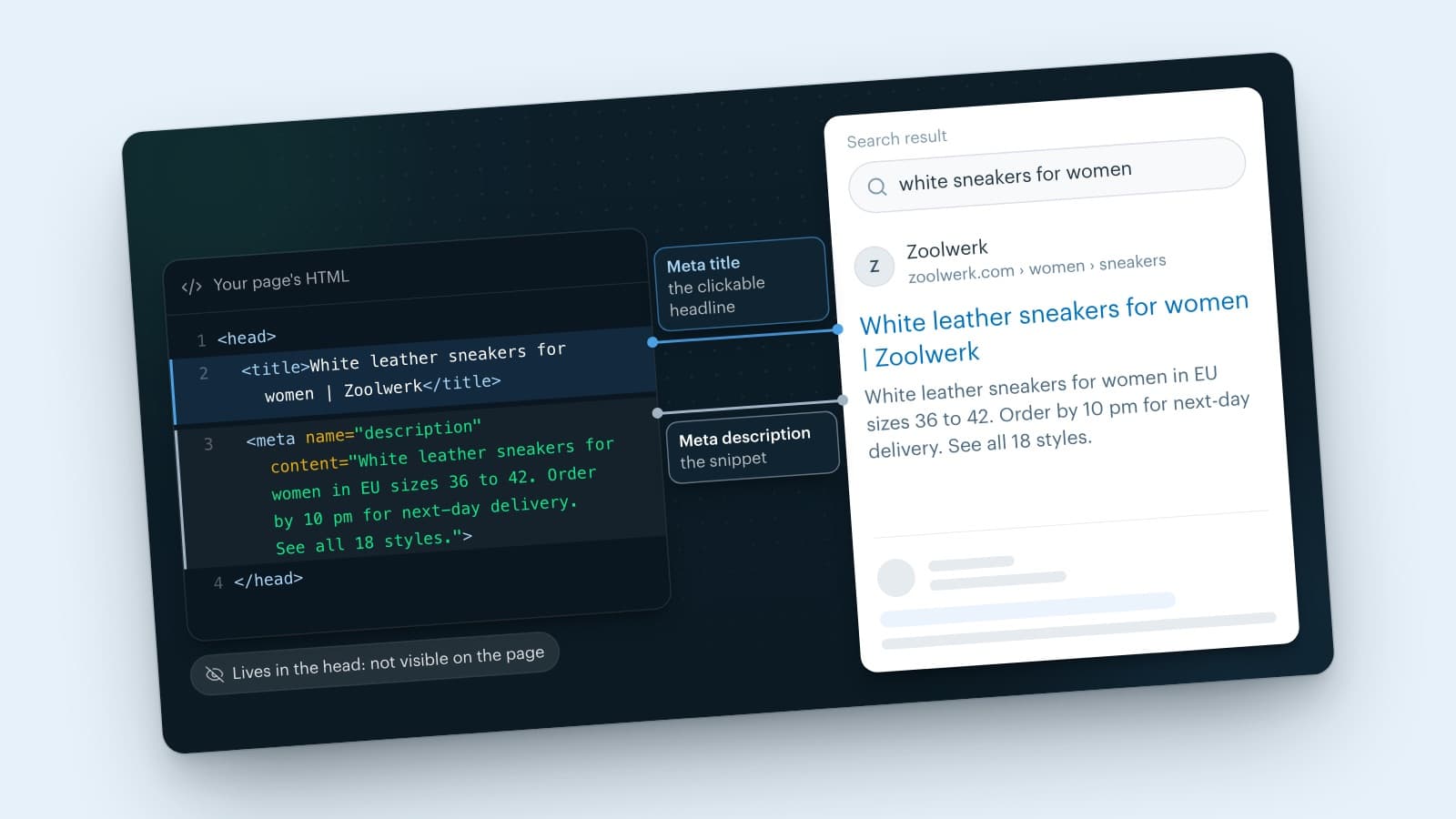
To write a meta title, describe the page in 50 to 60 characters and put your main keyword first. To write a meta description, summarize the page in 120 to 155 characters: what the reader gets, why this page, and what to do next. Make both unique for every page, and only promise what the page delivers.
Below you'll learn how to write meta title and description tags step by step: what Google does with them, how long they can be in characters and in pixels, and good and bad examples, including for an online store with hundreds of product pages. New to search engine optimization? Start with what SEO means.
What are meta titles and descriptions?
A meta title (also called a title tag or SEO title) is the title of a page as you define it in the HTML code. Google usually shows it as the clickable headline of your search result, and your browser shows it in the tab. You don't see it on the page itself: that's the H1, the heading above your text.
A meta description (also called an SEO description or description tag) is a short summary of the page. Google sometimes shows it as the grey text below the title: the snippet. You don't see this text on the page either.
Both live in the head of your page, the part of the code visitors don't see:
<title>White leather sneakers for women | Zoolwerk</title>
<meta name="description" content="White leather sneakers for women in EU sizes 36 to 42. Order by 10 pm for next-day delivery. See all 18 styles.">
Most CMS and online store platforms don't ask you to type that code. You fill in a field per page, named something like "SEO title", "page title" or "search engine listing", and the system writes it into the code.
What does Google do with them?
-
The title. Google decides the headline of your result (the title link) itself, but your title tag is its main source. If it's too long, too vague or stuffed with keywords, Google picks something else: your H1, another prominent heading on the page, or the text of links pointing to your page (Google Search Central).
-
The description. Google builds the snippet mainly from the text on your page, and uses your meta description when it describes the page better (Google Search Central). A good description raises the odds that Google shows your text. It's not a guarantee.
Google's documentation describes the meta description only as a source for the snippet, not as a ranking factor. Its value is in the click: a snippet that matches the search can bring in more visitors from the same position. The title matters most to the reader, because it's the first thing they read.
How to write meta keywords (and why you can skip them)
Meta keywords are a comma-separated list of search terms in the keywords meta tag. You can skip writing them. Google Search doesn't use the keywords meta tag (Google SEO Starter Guide), and filling it in only shows competitors which terms you target.
If your CMS has a meta keywords field, leave it empty and spend the time on your title and description. Other meta tags do still matter, such as the robots tag (for example noindex) and the viewport tag for mobile.
How long should a meta title and meta description be?
Google doesn't set a maximum. It shortens the title and the snippet once they no longer fit the screen, and that limit is a width in pixels, not a number of characters. A W is wider than an i, so two titles of 55 characters can look very different in Google.
These rules of thumb keep your text intact in practice:
| Meta title | Meta description | |
|---|---|---|
| Where Google cuts it off | around 600 pixels wide | around 680 pixels, depending on the device |
| Rule of thumb in characters | 50 to 60 characters | 120 to 155 characters |
| What goes first | your keyword | the core of your promise |
The pixel limits come from Moz, which tracks them in its guides to title tags and meta descriptions (both updated in March 2025). On mobile the limit can fall in a different place than on desktop. So put the most important words first: wherever Google cuts, the core stays.
Too short is a problem too. A one-word title such as "Home" or "Sneakers" tells the searcher nothing and gives Google a reason to pick its own headline. The ideal length sits between too short and cut off: long enough to answer the question, short enough to stay whole.
How to check your meta title and description
- Right-click your page, choose View page source and search for
<title>andname="description". - Search Google for
site:followed by your URL to see which title and snippet Google shows right now. - A SERP preview tool measures your text in pixels and shows it as it would appear in Google, on desktop and mobile.
How to write a meta title: 5 steps
A good meta title tells you, in one line, what the page is about and why this page is the answer. A formula that almost always works:
Keyword: benefit or detail | Brand name
Step 1. Choose one keyword per page
The keyword is the question the page answers, in the searcher's own words. In Google Search Console, open Performance to see which search terms a page already gets impressions for: that's where your best candidate is. For a new page, Google Keyword Planner shows how often people search for a term.
Add one or two longer variants (long-tail keywords), such as "white leather sneakers for women" next to "women's sneakers". To optimize title tags and meta descriptions for long-tail keywords, put the main keyword first and let the longer variant follow naturally. You'll rank sooner on those specific searches.
Step 2. Put the keyword first
People scan search results. When the word they searched for sits at the start of your title, they see straight away that your page is about it. And if Google shortens the title, the keyword survives.
Step 3. Say what the reader gets
After the keyword, tell people why they should click your result. Pick what's true for the page:
- Completeness: "complete guide", "step by step", "with examples".
- Numbers: "7 tips", "12 styles". A number stands out between words.
- Speed: "in 5 minutes", "without tools".
- Freshness: a year or "updated", but only if you actually keep the page up to date.
- Offer (product pages): sizes, material, delivery time or free returns, if you can deliver on it.
Step 4. Put your brand name at the end
Google suggests adding your site name at the start or end of the title, separated by a hyphen, colon or pipe. The end works best: the title then starts with what the searcher looked for. Many systems add the brand name automatically, so count those characters too.
Step 5. Check it and keep it unique
Read the title out loud. Does it match the content? Is the same title used on another page? Does it fit within about 600 pixels? Title case and sentence case both work in English: pick one and use it everywhere.
Meta title examples: good and bad
| Page | Weak title | Better title | Why it's better |
|---|---|---|---|
| Product page | Sneakers | White leather sneakers for women, sizes 36-42 | Zoolwerk | Keyword first, concrete offer, brand last |
| Category page | Women | Shoes | Sneakers | Zoolwerk Online Shop | Women's sneakers: white, black and leather | Zoolwerk | Choice instead of a list of menu items |
| Blog post | Blog | How to clean sneakers in 5 steps | A promise and a number that match the search |
| Homepage | Home | Zoolwerk: shoe store in Haarlem and online | On the homepage, the brand can go first |
This page's own meta title is "How to write a meta title and description for SEO": the search phrase first, and " | Afosto" at the end.
How to write meta descriptions for SEO
A perfect meta description doesn't exist, because Google picks the text it shows for each search. A good one does. Knowing how to write a meta description for SEO comes down to three questions in two sentences: what will I find here, why is this the best page for my search, and what can I do next? Here's how to write a good meta description, step by step:
-
Start with the topic and your keyword. Searchers want to see in the first few words that they're in the right place.
-
Include concrete facts. Google suggests pulling together information that's scattered across the page. For a book, that's the author, the price and the number of pages. For a product, the sizes, the material and the delivery time.
-
Show what the reader gets out of it. Not "we're the best", but what they'll find on the page.
-
End with a fitting action. "See all styles", "Read the steps", "Compare sizes". Skip "click here".
-
Write a unique description for every page. Identical descriptions across a site don't help anyone, Google says.
-
Keep it to 120 to 155 characters, with the core in the first 120.
Write in plain sentences. Google names a list of keywords as a bad example, because it doesn't tell the searcher what the page offers.
How to optimize meta descriptions on existing pages
Don't start from scratch: start where the gain is. In Search Console, open Performance, choose the Pages tab and sort by impressions. A page with many impressions and few clicks at a top-10 position is your first candidate. Rewrite its title and description, and compare the same period again after four to eight weeks.
Good meta description examples
| Weak description | Better description | Why it's better |
|---|---|---|
| Sewing supplies, yarn, colored pencils, sewing machines, threads, bobbins, needles | Get everything you need to sew your next garment. Open Monday-Friday 8-5pm, located in the Fashion District. | Describes the shop and gives useful details instead of a keyword list (Google's own example) |
| Mechanical pencil | Self-sharpening mechanical pencil that autocorrects your penmanship. | Specific and detailed instead of two words (Google's own example, shortened) |
| Welcome to Zoolwerk, the webshop for all your shoes! | White leather sneakers for women in EU sizes 36 to 42. Order by 10 pm for next-day delivery. See all 18 styles. | Keyword, facts and an action, within 120 characters |
| In this article you'll read everything about cleaning sneakers. | How to clean sneakers without damage: the right method for each material, from leather to suede, in five steps. | Promises a concrete result and says who it's for |
Why does Google rewrite your title or description?
If Google shows different text than you entered, it's usually one of these causes:
-
The title is too long or too vague. Google then looks for a better heading on the page, often the H1.
-
The title is stuffed with keywords or looks like many other pages, such as "Product | Zoolwerk" on a hundred product pages.
-
The title and the page say different things. If the title promises "free shipping" and the page never mentions it, Google picks something else.
-
The description doesn't match this search. Google picks the text that fits each search best, so a different search term can show a different snippet.
-
Google hasn't revisited the page yet. You'll only see a new title after Google's next visit. With URL Inspection in Search Console, you can request that visit yourself.
Meta titles and descriptions for hundreds of product pages
If your online store has 2,000 products, you won't write 2,000 titles by hand. You don't need to. For large sites with pages built from a database, Google calls generated descriptions appropriate, as long as they truly describe the page (Google Search Central).
So work with a template that you fill with product data:
- Title:
Product name Color Material | Brand name - Description:
Product name in material, sizes x to y. Delivery time. Action.
Write by hand for the pages that make the difference: your homepage, your main categories, your best sellers and the pages with the most impressions in Search Console. An AI writing tool can draft the rest from your product data, as long as you check every result against the page. More in AI for SEO copywriting.
A template is only as good as the data behind it. If half your products have no color or material, you get titles like "Sneaker | Zoolwerk": vague, and the same on dozens of pages. And if you also sell in a store or on marketplaces, you don't want to maintain those product texts in three places. More on that in how to start building your product data file.
In Afosto, product data lives in one place, the product information management system (PIM): multilingual, with custom attributes and required fields, and you can edit products in bulk. Make the fields your template needs required, and every new product has them from the start. From the PIM, product content goes to your own webshop and to marketplaces such as Amazon and Kaufland. The CMS for your webshop also includes SEO tools.
Managing product data for a store and a webshop? Afosto keeps your products in one place, in every language, and lets you edit them in bulk. Create a free account to look around.
Meta title best practices and common mistakes
Most meta title best practices and meta description best practices come down to avoiding these mistakes:
- The same title or description on several pages.
- Stacking keywords, such as "sneakers, buy sneakers, cheap sneakers".
- A title that promises something the page doesn't deliver.
- Copying the first paragraph of the page without checking whether it works as a standalone text in Google.
- A year in the title that you never update afterwards.
- Pages without a title or description, often filter pages and old products.
Once you know how to write meta titles and descriptions, a good pair takes a few minutes per page. Start with the pages that get the most impressions, and check in Search Console after a few weeks whether more searchers click your result.
Run every channel from one place
Orders, stock, POS and shipping in one system.
Create free accountBook a demoFrequently asked questions
How long should a meta title be?
Google sets no maximum, but it cuts the title off once it no longer fits the screen. According to Moz, that happens at around 600 pixels, which works out at roughly 50 to 60 characters. Wide letters such as W and M fill that space faster than narrow ones. Put your main keyword at the start, so it stays visible even when Google shortens the title.
How long should a meta description be?
There's no official limit. Google shortens the snippet to fit the device width, which Moz puts at around 680 pixels, or roughly 120 to 155 characters. How many characters fit depends on the device and on how wide the letters are. Put the core of your message in the first 120 characters, so it stays visible on mobile too, and make every description unique.
Do meta descriptions affect rankings?
There's no evidence that they do. Google's documentation describes the meta description only as a possible source for the snippet in search results, not as a ranking factor. Its value is in the click: a description that matches the search can bring in more visitors from the same position. The meta title carries more weight, because Google usually shows it as the clickable headline of your result.
What is the difference between a meta title and an H1?
The meta title sits in the head of the HTML. You see it in Google and in your browser tab. The H1 is the heading above the text on the page itself. They can differ: the title is short and written for the click, while the H1 can be longer. Keep them about the same topic, though, because Google may use your H1 instead when the title doesn't match the page.
Why does Google show a different title or description than the one I wrote?
Google may choose the title and the snippet itself. A title that is too long, too vague, stuffed with keywords or identical across many pages is often replaced, for example by the H1. The description is chosen per search: if a passage on your page fits the question better, Google shows that instead. A new title only appears after Google has visited your page again.
Do I still need meta keywords?
No. Google states in its SEO Starter Guide that Google Search doesn't use the keywords meta tag, so filling it in has no effect on how Google ranks your page. It only shows competitors which terms you target. If your CMS has a meta keywords field, you can leave it empty and spend the time on a clear meta title and a useful meta description instead.