

What is an order management system (OMS)? How it works
An order management system (OMS) collects orders from every sales channel in one place. Learn how it works, its key features and when you need one.
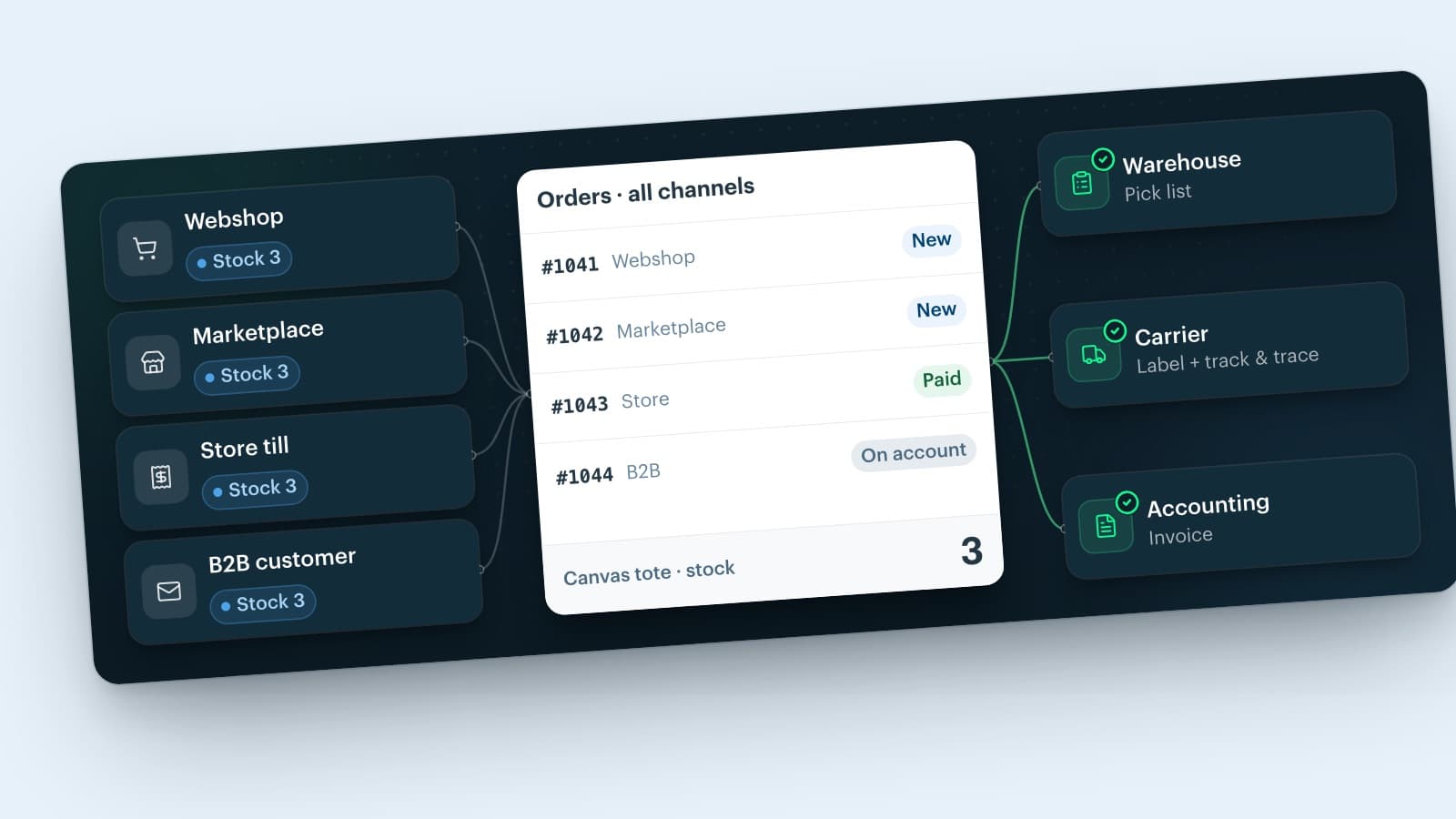
An order management system (OMS) is software that collects orders from all your sales channels in one place and guides each order from purchase to delivery, invoice and return. It keeps stock in step across those channels, sends the work to your warehouse and reports the status back to the channel and the customer.
Order management is the process behind it: everything between the moment a customer places an order and the moment you close it. This guide explains what an OMS does, how it works step by step, which features matter, how it differs from a WMS and an ERP, and when your business needs one.
What is an order management system (OMS)?
An order management system is the software that captures, tracks and fulfils customer orders across every channel you sell through. OMS is the abbreviation, and in software menus you also see order mgmt. Other names you come across are order system, ordering management system and order management platform.
Without an OMS, every channel keeps its own orders. Webshop orders sit in the webshop admin, marketplace orders in a seller portal, store sales in the till and B2B orders in someone's inbox. An OMS brings them together in one order list and links them to one stock.
Order management definition
Order management is the process of receiving, recording, fulfilling and following up customer orders. The order management system is the tool that runs that process, so your team handles every order the same way, wherever it came from.
The abbreviation OMS also appears in other fields. In finance it stands for software that executes trades in securities, and in advertising for software that books ad campaigns. This guide is about customer orders in retail, e-commerce and wholesale.
How does an order management system work?
Every order follows the same route, whether it comes from a webshop, a marketplace or a store till. The OMS takes over as soon as the customer confirms the order and steps in at every handover after that.
1. Capture the order
The OMS imports the order from the channel: customer, address, products, prices, shipping method and payment. Orders from every channel land in the same list and in the same format, so nobody retypes them.
2. Check and reserve stock
The OMS checks whether the products are available and reserves the units for this order. Other channels can no longer sell those units, and every channel receives the new stock level.
3. Release or hold the order
Rules decide what happens next. An order with everything in stock moves on to the warehouse. An order with an invalid address, a missing item or a payment that has not come in waits until someone sorts it out.
4. Pick, pack and ship
The warehouse receives a pick list, packs the order and prints a shipping label. In a larger warehouse, a warehouse management system (WMS) linked to the OMS handles this step.
5. Inform the channel and the customer
Once the parcel leaves, the OMS sends the track and trace code back to the channel the order came from and emails the customer. People often call this customer-facing part customer order management: confirmations, status updates and a quick answer to "where is my order?".
6. Invoice and payment
The OMS creates the invoice, matches it to the payment and passes the figures on to your accounting software.
7. Handle returns and cancellations
When a customer cancels or sends something back, the OMS records it on the original order, books returned items back into stock and informs the channel. In the EU, consumers can withdraw from most online purchases within 14 days without giving a reason (Your Europe), so returns belong to the normal flow.
Key features of an order management system
Which features you need depends on your channels and your volume. These are the order management system features that matter most in retail, e-commerce and wholesale.
-
Multichannel order capture: orders from webshops, marketplaces, store tills and B2B customers in one list, including orders your team enters by hand.
-
Central inventory: one stock per product and location, with updates to every channel. That is what people mean by an inventory and order management system.
-
Stock allocation: units reserved per order, so two channels never sell the same item.
-
Order rules and automation: release, hold or approve orders without manual work. An automated order management system handles the routine orders, and your team only looks at the exceptions.
-
Fulfilment: pick lists, packing and shipping labels, built in or through a link with your WMS or fulfilment partner.
-
Track and trace: shipping status back to the sales channel and to the customer.
-
Invoicing: an invoice per shipment with the right VAT rate, passed on to your accounting.
-
Returns and cancellations: return requests from the channels, refunds and returned stock back on the shelf.
-
Customer and B2B data: order history per customer, company accounts and customer-specific prices. This is where CRM and order management meet.
-
Reporting: orders per channel, delivery times, return rates and margin per order.
-
Integrations and API: links with ERP, accounting, CRM and carriers, plus an API for anything custom.
OMS vs WMS vs ERP vs CRM
An OMS rarely works alone. A useful rule of thumb: the OMS runs the order, the WMS runs the warehouse, the ERP runs finance and planning, and the CRM manages the customer relationship.
| System | Main job | Typical tasks |
|---|---|---|
| OMS | Run each order across channels | Capture orders, reserve stock, release, report status |
| WMS | Run the warehouse | Receiving, locations, picking, packing |
| ERP | Run finance and planning | Accounting, purchasing, production |
| CRM | Manage customer relationships | Contacts, sales pipeline, campaigns, service |
OMS vs WMS
The OMS decides what has to ship and from which stock. The warehouse management system decides how your team gets it off the shelf: which location, which picker, which box. Smaller businesses often use one platform that does both.
OMS vs ERP
An ERP system covers the whole business: finance, purchasing, planning and often production. Many ERPs include an order module for orders that sales staff enter. A dedicated OMS handles a constant stream of orders from webshops, marketplaces and stores, and passes orders and invoices on to the ERP.
CRM and order management
A CRM stores who your customers are and what you agreed with them. The OMS stores what they ordered and where it is now. Customer service works faster when it sees both side by side.
Order management in the supply chain
In the supply chain, the OMS sits between demand and supply. Orders come in from the sales channels, and the OMS passes the work on to warehouses, suppliers, fulfilment partners and carriers.
Types of order management systems and solutions
Order management solutions range from the order screen in your webshop to enterprise platforms. Five types cover most of the market.
Built into your e-commerce platform
Shopify, WooCommerce and Adobe Commerce (Magento) come with order screens for their own store. For one webshop that is often enough. Once you add a marketplace, a store or B2B customers, you often need extra apps or integrations to bring those orders and the stock into one place.
Marketplace seller tools
Amazon Seller Central and other marketplace dashboards let you manage the orders from that marketplace. They do not see your webshop or store sales, so keeping stock in step across channels stays with you.
Cloud-based order management platform
A standalone, online order management system runs in the browser and connects all your channels. The vendor hosts and updates the software, so you pay a subscription instead of running servers. Many small and mid-sized retailers and wholesalers choose this hosted order management model.
Enterprise and distributed order management
Large retailers with many stores and warehouses use enterprise order management, also called distributed order management (DOM). Its routing rules decide which location fulfils each order, based on stock, distance and cost. These systems often need a longer implementation project.
Custom-built systems
Some companies design and develop their own OMS. That gives full control over every rule, but you also build and maintain every channel integration yourself, and each change to a marketplace API becomes your work.
When does your business need an order management system?
A single webshop with a handful of orders a day runs fine on the order screen of its platform. The case for an OMS grows with every channel, location and type of customer you add.
That situation is common. In 2024, 85.65% of EU enterprises with web sales sold through their own website or app and 45% through an online marketplace, according to Eurostat. Those shares add up to more than 100%, so at least three in ten web sellers used both.
Signs that you have outgrown manual order management:
- You sell in a store and online, and the stock figures do not match.
- You sold an item that was already gone.
- Someone copies orders, addresses or track and trace codes from one system to another.
- B2B customers order by email or phone, and someone retypes the order.
- Customer service needs three screens to answer "where is my order?".
- You plan to open a second warehouse or store.
Benefits of an order management system
- Fewer errors, because nobody retypes orders.
- No overselling, because every channel sees the same stock.
- Faster dispatch, because the warehouse works from one list.
- Better service, because customer service sees every order and its status.
- Better decisions, because you see sales, returns and margin per channel.
Recognise two or more of these signs? In Afosto you connect your sales channels yourself and see every order and stock level in one place. Create an account and try it with your own orders.
Order management system for retail: store and webshop together
Retailers with physical stores have an order stream that pure webshops lack: the till. A sale at the counter takes an item off the shelf that the webshop and marketplaces still show as available, unless every channel works from the same stock.
Afosto is a commerce platform for retailers and wholesalers in the Netherlands and Belgium. It combines an order management system, warehouse management, a point of sale and a webshop on one platform. Every receipt at the till is straight away an order in the same system as your webshop and marketplace orders, and it books off the stock of that store.
Afosto connects webshops on Shopify, WooCommerce, Lightspeed eCom, ePages and Magento 2, and marketplaces such as bol.com, Amazon, Kaufland and Mirakl-based marketplaces. More marketplaces connect through EffectConnect. When an order comes in, Afosto reserves stock from the locations linked to that channel and sends the new stock level to the connected webshops and marketplaces.
Per channel you can deduct a safety stock, so a marketplace does not sell your last units. Sharing one stock between store and webshop takes the OMS/WMS Pro package.
You also choose per channel how orders flow: in-stock items to the pick list straight away, approval before shipping, or a hold while the address is invalid. When a parcel ships, the track and trace code goes back to the channel, the customer gets an email and Afosto creates the invoice. For bol.com and Kaufland, the invoice PDF goes to the marketplace as well.
Exceptions follow the same route. Return requests from bol.com arrive on the order, and your approval or rejection goes back to bol.com. Cancellations sync both ways with Shopify and Magento 2. On every order, a margin tab sets revenue against cost price and costs such as shipping, for the whole order and per order line.
Do you sell in a store and online in the Netherlands or Belgium? Tell us how your channels run today, and we show you how orders, stock and the till work together in Afosto. Request a demo: we follow up within one working day.
How to choose an order management system
Start from your own orders, not from a feature list. Write down your channels, locations and order types for today and for the next two years, then check each system against these points.
-
Channels: direct connections with the webshops, marketplaces and tills you use, so orders and stock flow without manual exports.
-
Stock: one stock across channels and locations, with a buffer per channel if you sell on marketplaces.
-
Fulfilment: warehouse functions in the system itself, or a solid link with your WMS or fulfilment partner.
-
Exceptions: partial deliveries, returns, cancellations and B2B orders. Order management mostly goes wrong on the exceptions, not on the standard order.
-
Usability: process ten real orders with your own team during a trial. Count the clicks per order and check whether a new colleague can learn it in a day.
-
Integrations and data: links with accounting, ERP and CRM, an API and exports, so your data stays yours.
-
Total cost: subscription, transaction fees, apps and implementation together, compared at the same functionality.
Want to compare specific systems? Our overview of the best order management software puts the main options side by side.
An order management system turns orders from many channels into one process: one list, one stock and one route from order to invoice. Whether you need one depends less on the size of your business than on the number of places where you sell.
Run every channel from one place
Orders, stock, POS and shipping in one system.
Create free accountBook a demoFrequently asked questions
What does OMS stand for?
OMS stands for order management system: software that collects orders from all your sales channels, keeps stock in step and guides each order through fulfilment, invoicing and returns. In finance, OMS can also mean software for trading securities, and in advertising a tool for booking campaigns. In retail, e-commerce and wholesale, it always refers to customer orders.
What is an order management system used for?
Businesses use an order management system to process orders from every channel in one place: webshop, marketplaces, store tills and B2B customers. The OMS reserves stock, sends pick lists to the warehouse, passes track and trace to the channel and the customer, creates invoices and handles returns. That saves retyping, prevents overselling and gives customer service one view of every order.
What is the difference between an OMS and a WMS?
An OMS manages the order: where it came from, which stock it uses, its status and what the channel and the customer hear. A WMS manages the warehouse: receiving, locations, picking and packing. The OMS tells the warehouse what to ship, and the WMS decides how the team gets it off the shelf. Many smaller businesses use one platform that does both.
Is an ERP the same as an order management system?
No. An ERP covers finance, purchasing, planning and often production across the whole business. Many ERPs have an order module for orders that sales staff enter. A dedicated OMS focuses on orders from many channels at once, such as webshops, marketplaces and stores, with stock updates and status messages to each channel. Businesses often link the two, so orders and invoices flow into the ERP.
What are the main features of an order management system?
The core features are order capture from every channel, central inventory with updates to each channel, stock allocation, rules to release or hold orders, pick lists and shipping labels, track and trace for channel and customer, invoicing, returns and cancellations, and reporting. Most systems also connect to accounting, ERP and CRM software through integrations or an API.
Does a small business need an order management system?
Not always. With one webshop and a few orders a day, the order screen of your webshop platform is usually enough. An OMS starts to pay off when you add a second channel or location, such as a marketplace, a physical store or B2B customers. From then on, keeping orders and stock in step by hand costs time and leads to overselling.