

What is internal site search? How it works and SEO tips
Internal site search is the search bar on your own website. See how an internal search engine works, what it means for SEO and 8 ways to improve it.
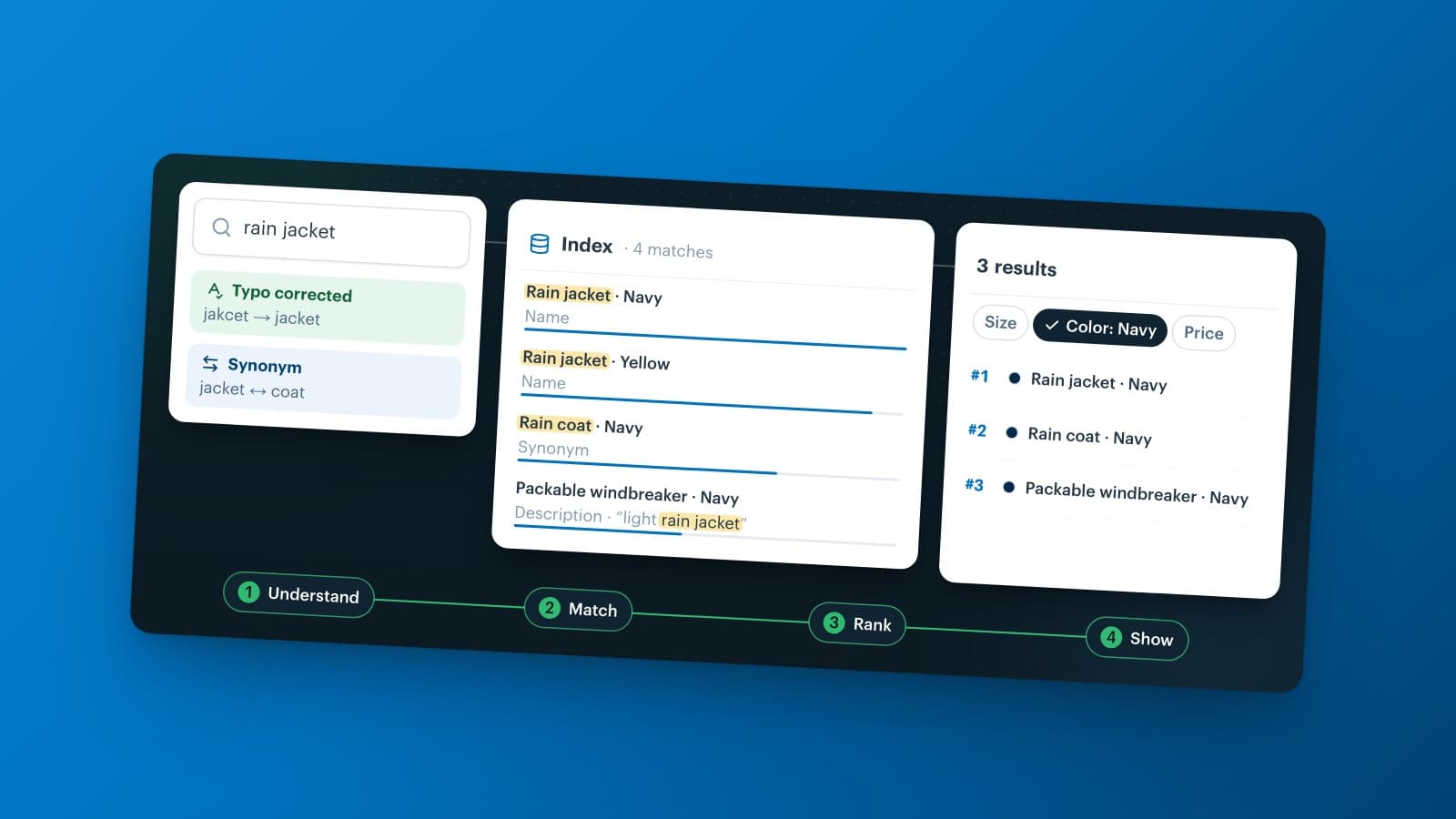
Internal site search is the search function on your own website. A visitor types a query into the search bar and gets results from that one site only, such as products, pages or help articles. Behind the bar runs an internal search engine that indexes your content, matches each query, ranks the results and often lets visitors filter them.
You will also hear it called internal search, on-site search or internal website search. For a webshop it is often the shortest route from "I want this" to the product page. And every query tells you, in your customer's own words, what they came for. This guide explains how internal site search works, what it means for SEO and marketing, and how to improve it.
What is internal site search?
Internal site search lets visitors search the content of one website from a search bar on that site. The results come from an index that the site keeps of its own products, pages and documents. Google plays no part in it.
You use it every day without noticing:
- the search bar of a webshop, which returns products, categories and brands;
- the search field of a help center, which returns articles such as "how do I return an order";
- the search on a news or documentation site, which returns articles and pages.
In a company context, "internal search" can also mean enterprise search: employees who search their own documents, drives and tools. This article is about search on a website.
Internal search vs external search
An external search engine such as Google searches the whole web and decides for itself which pages rank. Internal search covers one site, and the site owner decides what the results look like.
| Internal site search | External search (Google) | |
|---|---|---|
| What it searches | One website: its products, pages and documents | Billions of pages across the web |
| Who sets the order | The site owner, in the search settings | The search engine, with its own algorithm |
| Typical query | "black chelsea boots size 42", "returns" | "best chelsea boots", "shoe shop near me" |
| The visitor | Is already on your site | Still has to choose a site |
| Data you get | Every query, click and search without results | Aggregated queries in Search Console |
Working on external search is SEO. Working on internal search makes sure that a visitor who already chose your site finds what they came for. The two meet in the data, as you will see below.
How does an internal site search engine work?
Every internal website search engine, from the built-in search of a webshop platform to a dedicated search service, takes the same steps:
-
Indexing. The engine reads your content from a source, such as a product catalog, a feed or your CMS, and stores it field by field: name, brand, color, description, price.
-
Understanding the query. It lowercases the query, ignores stop words such as "the" and "for", corrects typos and applies synonyms, so "trainers" also finds "sneakers".
-
Matching. It looks up which documents contain the words. Many engines match on prefixes, so results appear while the visitor is still typing.
-
Ranking. Rules decide the order: how many words match, how many typos the match needs, in which field the match sits and how exact it is. A match in the product name usually counts for more than one in the description.
-
Showing results. The visitor sees suggestions, a result list and filters such as size, color and price to narrow the list down.
-
Logging. The engine records every query, the number of results and the clicks. That log is the raw material for the analytics section further down.
A website internal search engine has to do all of this in a fraction of a second, because a fresh query runs on every keystroke. That is why the quality of your index and your product data matters as much as the engine itself.
Ecommerce internal search: why webshops depend on it
In e-commerce, a visitor who types into the search bar usually knows what they want. They are the online version of a customer who walks up to a shop assistant and asks for it. When search fails them, your range looks empty, even when the product sits on the shelf.
That happens more often than you might think. In its search benchmark, the Baymard Institute found that 56% of ecommerce sites fail to adequately support users' search needs (published in 2024, updated in April 2026). The research groups searches into types that a good engine has to handle, for example:
- product type searches, such as "jacket";
- feature searches with a product attribute, such as "leather jacket";
- abbreviation and symbol searches, such as "13in laptop sleeve";
- non-product searches, such as the return policy or shipping information.
Non-product searches cause the most trouble: Baymard found issues on 66% of sites, and in testing some participants left the site when they could not find that information. So ecommerce internal search is not only about products. Shipping costs, returns and store opening hours belong in the results too.
Internal site search SEO: what it does and doesn't do
Internal site search is not a ranking factor in itself. Internal site search SEO works indirectly, in three directions.
1. Search data is keyword research in your customers' words. Search Console shows how people find you on Google. Your internal search log shows what they look for once they arrive, in the words they use.
A frequent query without a matching category page is a page waiting to happen. And when visitors search for "trainers" while your products say "sneakers", that word belongs in your titles and descriptions too.
2. Search result pages usually stay out of Google's index. Every query creates a new URL, so a crawler can find endless near-identical pages with little unique value. The usual approach is a noindex tag on search result pages. Robots.txt alone does not keep a page out of Google: for that, Google's own documentation points to noindex.
Once those pages have dropped out of the index, you can also block the search path in robots.txt to save crawl capacity. Google's guidance on faceted navigation (updated December 2025) recommends the same for filter URLs, plus a 404 status when a filter combination returns no results. Do you want to rank for a popular query? Then build a real category or landing page for it, with its own text.
3. Good search keeps visitors from going back to Google. Someone who lands on a category page from Google and doesn't see the right product will search once more. If your internal search finds it, you keep the visit. If it doesn't, they return to Google and click on the next result.
One outdated tip still goes around: the sitelinks search box. Google used to show a search field for some sites in its results, based on WebSite structured data with a SearchAction. Google removed that search box globally from November 21, 2024. You don't have to remove the markup, since unsupported structured data causes no errors, and Google still uses WebSite structured data for site names.
What does an internal site search URL look like?
On most sites, the search term ends up in the URL as a query parameter. A search for "rain jacket" might give:
https://www.example.com/search?q=rain+jacket
Here /search is the path of the result page, q is the parameter and rain+jacket is the term. Common parameter names are q, s, search, query and keyword. Some platforms put the term in the path instead, as in /search/rain-jacket.
To find yours, search for something on your own site and look at the address bar. You need that internal site search URL for three things: analytics reads the term from it, your robots.txt and noindex rules target its path, and your team can link straight to a result, for example from a newsletter.
Internal site search analytics: what to measure
The fastest way to start is Google Analytics 4. Its enhanced measurement includes a Site search event, view_search_results, which fires when a page URL contains one of five query parameters: q, s, search, query or keyword. The term lands in the Search term dimension. Does your site use another parameter, such as term? Then add it in the advanced settings of that event (Google Analytics Help).
With the data in place, internal site search analysis comes down to a handful of questions:
-
Top search terms. What do people look for most, and do those queries lead to a good result page?
-
Searches without results. Which queries return nothing? Each one points to a missing product, a missing synonym or a missing page.
-
Searches without clicks. Results appear, but nobody clicks: the ranking or the product data is off.
-
Refinements. Visitors who search twice in a row tell you that the first set of results missed.
-
Searchers vs non-searchers. Compare the conversion rate and order value of sessions with and without search on your own site, rather than relying on industry averages.
A dedicated search engine often adds its own reports, such as searches without results and the positions people click. Whichever tool you use, check the list once a month: it takes little time and has a direct effect.
What is internal search in marketing?
In marketing, internal search has two meanings, and it helps to know which one you are looking at.
In digital marketing, internal search means the search function on your website and the data it produces. Internal search marketing uses those queries as a direct line to demand. A query that suddenly rises can become a homepage banner or a newsletter topic, and a brand that visitors keep asking for but you don't stock is a buying signal. The words people use also feed your ad keywords and product copy.
In consumer behavior, internal search means something else: the buyer searches their own memory before a purchase. Someone who needs new running shoes and remembers a brand that served them well goes straight to it. When memory falls short, the buyer starts an external search: reviews, comparison sites, stores, Google.
Marketing textbooks call the first step internal information search, as opposed to external information search. It explains why brands invest in being remembered. Both meanings share one idea: the search starts with what the person already has, either your site or their own memory. The rest of this article is about the first.
Internal site search optimization: 8 best practices
Internal site search optimization is mostly a matter of removing friction. These internal site search best practices apply to any engine.
1. Make the search bar easy to find
On desktop, put a wide search field in the header, at the top center or top right. On mobile, show a visible field or a clear search icon next to the cart, not hidden in the menu. Placeholder text such as "Search products, brands or help" tells people what they can search for.
2. Show suggestions while people type
Autocomplete with query suggestions, categories and a few products saves typing. It also steers visitors toward queries that return results.
3. Understand typos and your customers' words
Accept small typos, handle singular and plural, and set synonyms for words your customers use differently than you do: "denim" and "jeans", "trainers" and "sneakers", "hoodie" and "sweatshirt". Abbreviations and units such as "13in" deserve a synonym too.
4. Weight the fields that matter
A match in the product name or brand should rank above a match deep in a description. Exact matches should beat partial ones.
5. Let visitors filter the results
A query like "blue dress" can return hundreds of products. Filters on size, color, price and brand let visitors narrow the list in a few taps. They only work when every product carries those attributes.
6. Never end on an empty page
Even a page with zero results can help: show a spelling suggestion, popular categories and a way to contact you. Better still, make sure the query finds something in the first place.
7. Search more than products
Add your service pages to the index: shipping, returns, payment, opening hours, size charts. Non-product searches are where Baymard found the most problems.
8. Fix the product data first
Search can only find what your data says. Product titles that name the product type, consistent attributes and complete specifications do more for search quality than any engine setting. After that, review your search terms every month and tune.
How to add internal site search to your website
There are three routes to add internal site search. The right one depends on the size of your range and how much control you want.
-
The built-in search of your platform. Most webshop platforms and CMSs include a search bar. It costs nothing extra, but it often matches only literal text and offers few settings.
-
A dedicated search service. You send your catalog to a hosted engine and connect your search bar with a ready-made internal site search script or widget, or through an API if you build your own front end. In return you get typo tolerance, synonyms, ranking rules and reports.
-
A self-hosted open-source engine. You get full control, but you run the servers, updates and tuning yourself, which takes developer time.
Before you choose, ask these questions:
- Does it search everything visitors look for, including service pages and help articles?
- Can you manage synonyms, stop words, ranking and filters yourself, without a developer?
- How does your data get in (feed, API or connector), and how often does it pick up new prices and stock?
- Does it handle the languages you sell in?
- Which search data do you get to see?
- How does the price grow: per search, per record or per month?
Internal site search with Afosto
Afosto has its own internal site search engine, Instant Search. You add your data as a source, a CSV file or a CSV feed such as an export of your product catalog, and connect one or more sources to a search engine. Because a source is a CSV, you can feed it from any system that exports one.
In the admin you set synonyms, stop words, ranking rules and filters on your own attributes. One search front end can combine several sources, such as products and help articles, with autocomplete and click tracking. Instant Search is one module of the Afosto platform, next to product information management (PIM), order management and the point of sale for retailers who sell in a store and online.
Want to see how your own products search? Create an Afosto account, add a CSV of your products as a source and test synonyms and filters in Instant Search. Getting started is free. Create an account
Where to start
Three checks you can do today, whatever engine you use:
- Search your own site for your three best-selling products, once with a typo and once with the word a customer would use. Do they show up?
- Open your search terms report and look for queries with zero results.
- Check that your search result pages carry a
noindextag, so they don't compete with your category pages in Google.
Run every channel from one place
Orders, stock, POS and shipping in one system.
Create free accountBook a demoFrequently asked questions
What is an example of internal site search?
The search bar of a webshop is the most common example. Type "black chelsea boots" and the shop's own engine returns matching products, often with filters for size and price. Other examples are the search field of a help center that finds articles such as "how do I return an order", and the search on a news site or documentation portal. In each case the results come from that one website only.
Does internal site search help SEO?
Indirectly. Internal site search is not a ranking factor in itself. But your search log shows which words customers use and which products or pages they miss, and that is keyword research you can't get anywhere else. Good search also keeps visitors who land on the wrong page from going back to Google. Keep the search result pages themselves out of the index with a noindex tag.
Should internal search result pages be indexed by Google?
Usually not. Every query creates a new URL, so search engines can find endless near-identical pages with little unique content. Add a noindex tag to your search result pages, and once they have dropped out of the index you can block the search path in robots.txt to save crawl capacity. If a query is popular, build a real category or landing page for it instead.
How do I track internal site search in Google Analytics 4?
Check that enhanced measurement and its Site search option are on in your GA4 web data stream. GA4 then records a view_search_results event whenever a page URL contains q, s, search, query or keyword, and stores the term in the Search term dimension. If your site uses another parameter, add it in the advanced settings of that event. Then build a report of search terms and their event counts.
What is internal information search?
In consumer behavior, internal information search is the first step of a purchase decision: the buyer searches their own memory for brands, products and past experiences. If memory gives a clear answer, they buy without further research. If not, they move on to external information search, such as reviews, stores and search engines. On websites, internal search usually means something else: the site's own search bar.
How much does internal site search cost?
That depends on the route. The built-in search of a webshop platform or CMS usually comes with your subscription. Dedicated search services often charge by the number of searches, the number of records or a monthly plan, so the bill grows with your traffic and range. A self-hosted engine has no license fee but costs hosting and developer time. Compare the total for the traffic you expect.