

The Exact Online integration that works both ways
You have run on Exact for years and that does not have to change. Connect Afosto and choose the direction per data stream: orders from Exact to Afosto or the other way around, plus invoices, stock and shipping details.




The retailers and wholesalers running their operation on Afosto
Trusted by ambitious retailers












What is an Exact Online integration?
An Exact Online integration links your sales and warehouse software to your Exact administration, so orders, invoices and stock do not have to be entered twice. Most webshop connectors only push orders towards the bookkeeping. Afosto's integration is broader: you choose per part what syncs and in which direction, and Exact can also be the source of your orders.







That way Exact stays the financial heart of your business, while Afosto runs the operation around it: order management, warehouse, webshop and point of sale.
The hybrid model
Orders in Exact, fulfilment in Afosto, bookkeeping stays correct
Many trading companies have entered sales orders in Exact for years and want to keep it that way. With the sync direction from Exact to Afosto, Exact stays your ERP and Afosto becomes the extension for warehouse and shipping. That is how the chain runs.
- Step 1
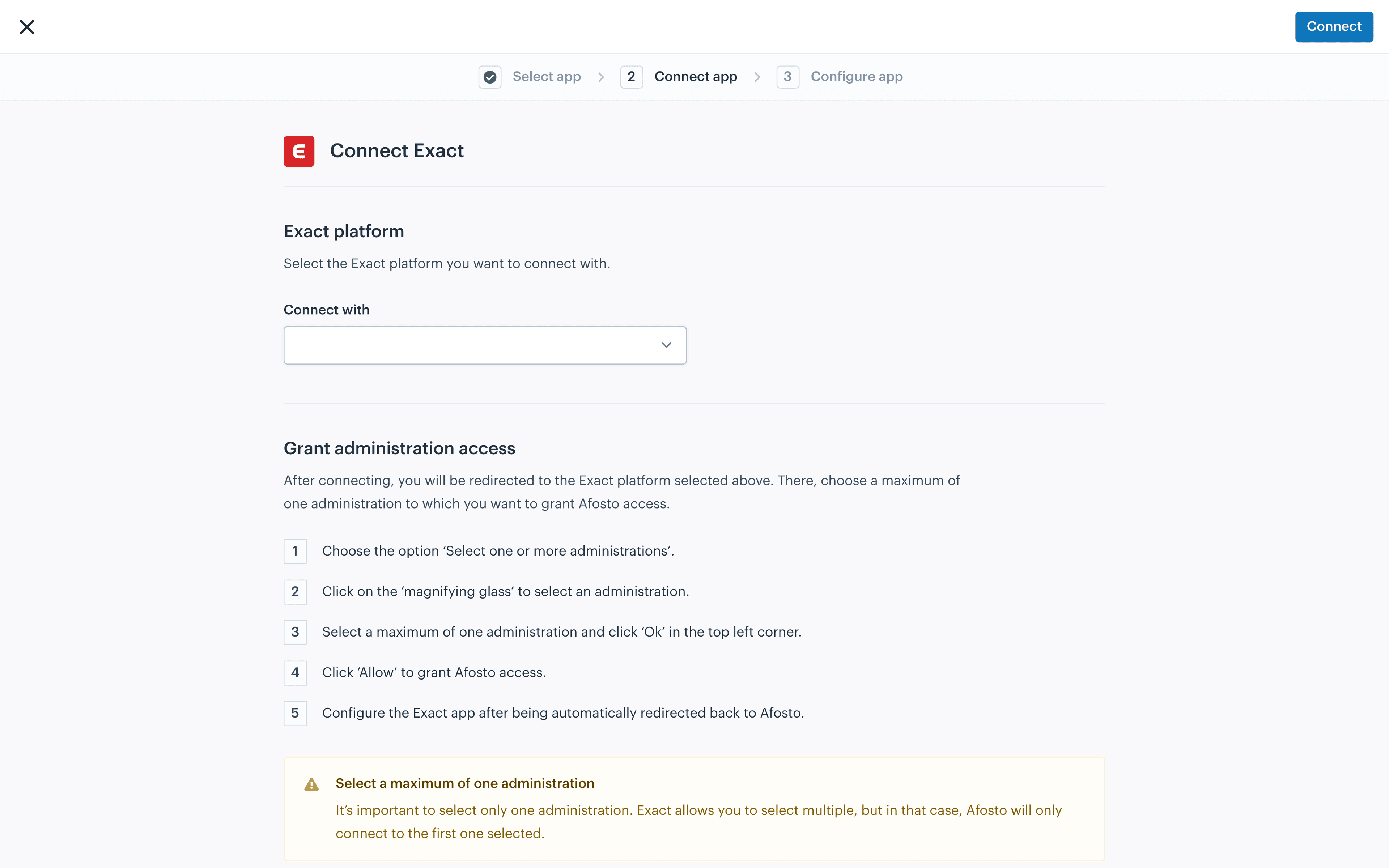
Connect Afosto to your Exact administration
Add the Exact app under Apps, tab Accounting. You connect to your Exact environment, give Afosto access to a single administration and then choose the sync direction per part. Saving activates the integration.

- Step 2
Orders from Exact arrive in Afosto
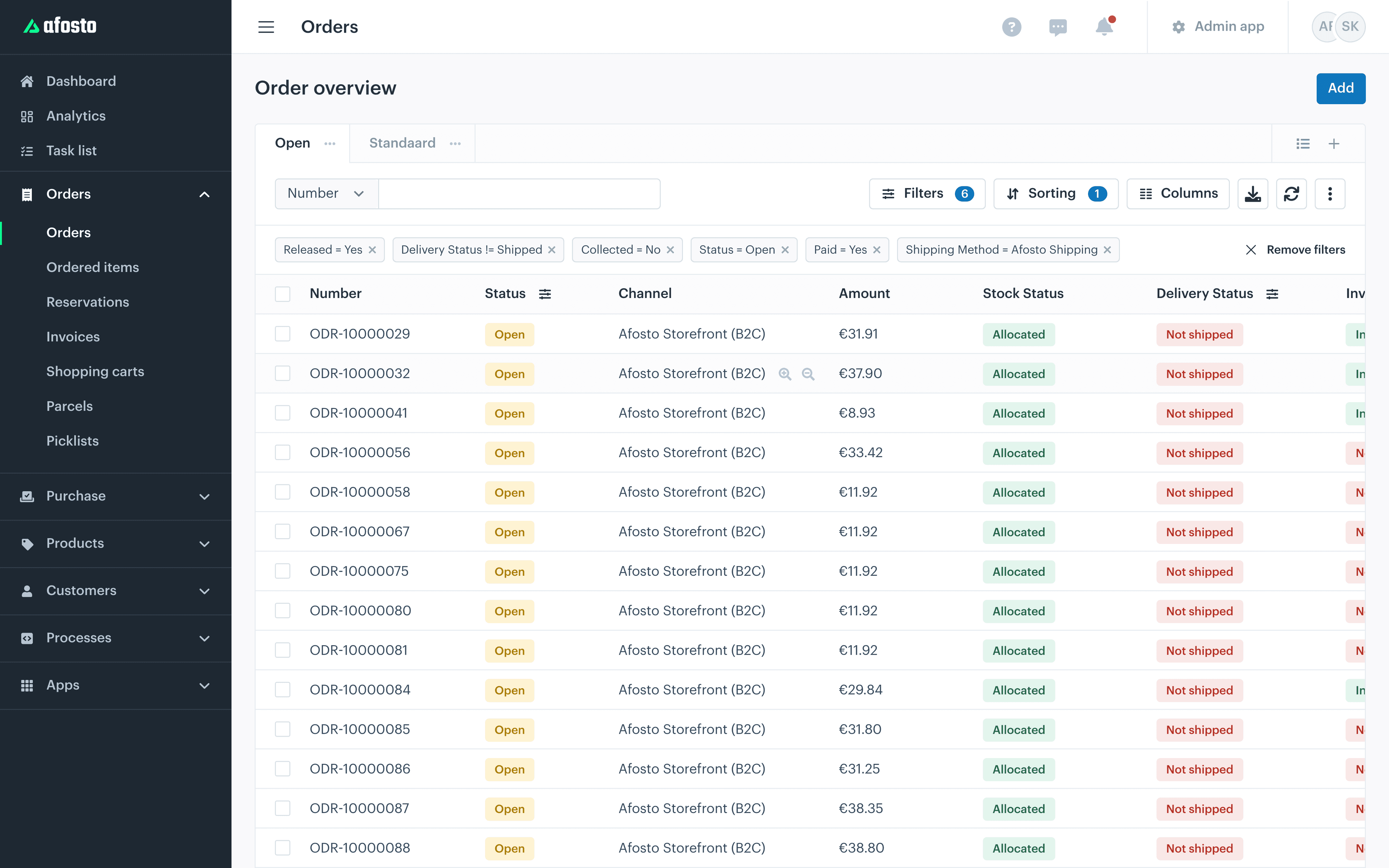
Sales orders created in Exact are added in Afosto and land in the same order stream as your webshop, point of sale and marketplace orders. The default warehouse catches orders that have no warehouse attached yet.

- Step 3
Your warehouse picks and ships through Afosto
The order runs through the WMS: reserve, pick with the scan app and ship with a label from your own carrier or broker. Your team works from a single pick list, whether the order came from Exact or your webshop.

- Step 4
Stock and invoices go back to Exact
Afosto sends stock snapshots per location to your linked Exact warehouses and posts invoices as a journal entry or full invoice in your administration. Your bookkeeping keeps up without anyone retyping anything.

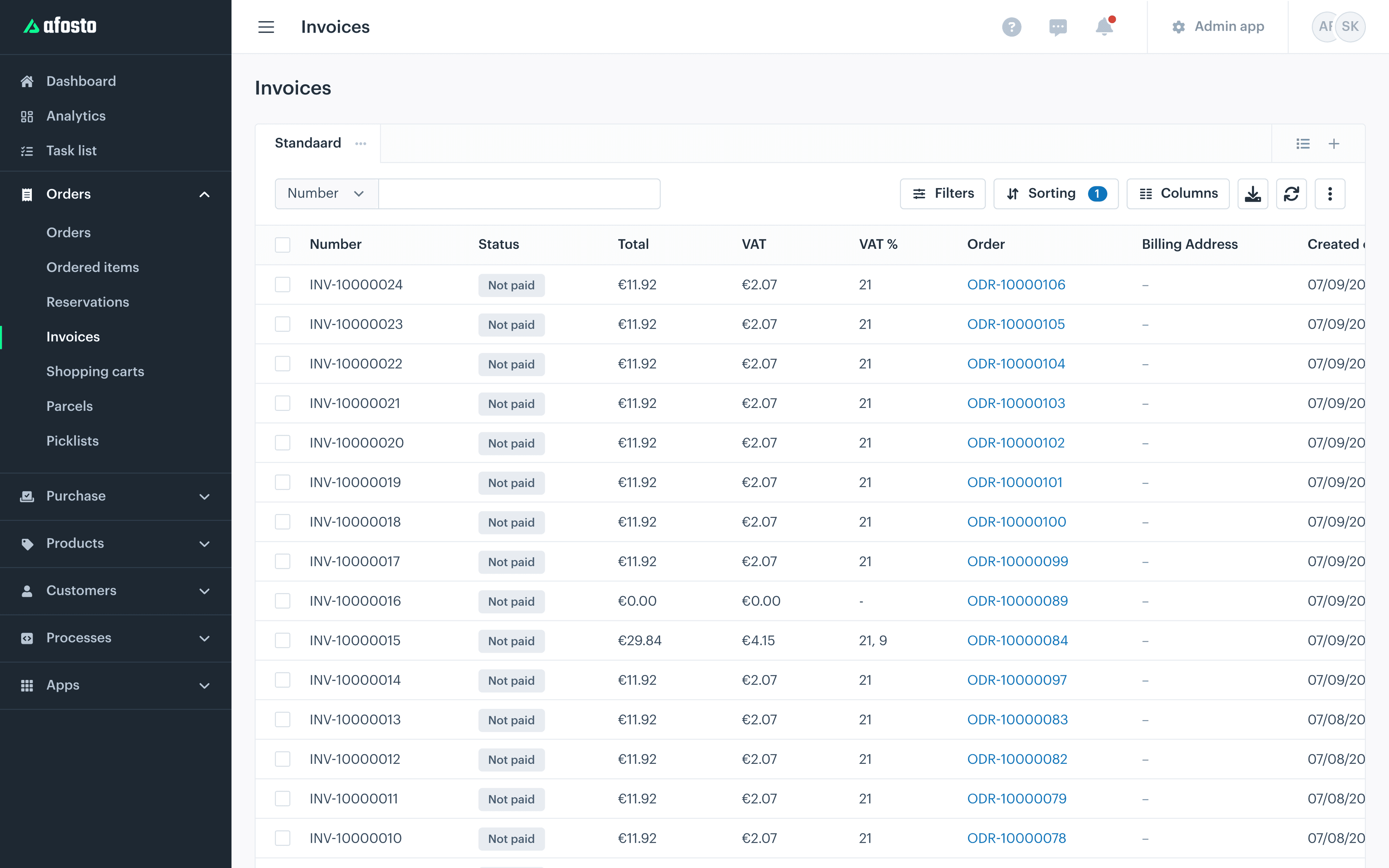
Selling through webshop, point of sale or a marketplace instead? Flip the direction: Afosto orders then land in Exact as an order or invoice, per sales channel on the right ledger account and journal.
The integration in numbers
Built to keep your bookkeeping up to date, not the other way around
3
Sync directions for orders: out, back or off
4
Matching steps before a duplicate debtor can appear
1
Administration per integration, multiple integrations side by side
0
Manual exports or transfers after activating
Interfaces
Exactly what goes over the line
No black box: these are the data streams between Afosto and Exact Online, and the switches you set them with yourself.

Directions for order sync
2 + off

Processing types for invoices
2

Leading system for stock
Afosto

Purchasing stream
Linked
Everything you set in the integration itself
Sales channels to ledger
Choose per sales channel whether the orders come along and link each channel to its own ledger account and journal in Exact.
VAT rates and reverse charge
Link the VAT codes from Exact Online to the VAT rates in Afosto. Reverse charging VAT? Turn on the option and choose the matching VAT code.
Payment methods to payment conditions
Link every payment method in Afosto to the right payment condition in Exact, so payments land in your administration the right way.
Create missing products automatically
Switch the option on and Afosto creates an article that does not exist in Exact yet as soon as it appears on an order or invoice.
Locations and default warehouse
Link your Afosto locations to Exact warehouses and set a default warehouse for orders that have no warehouse attached.
Shipping details from Exact
Sending your shipments from Exact Online? Sync the shipping details back to Afosto, so the order status is correct there.
Price lists linked
Link your price lists in Afosto to a price list in Exact, handy for agreements that need to be correct in both systems.
Reference per administration
Give every integration a recognisable reference, for example the name of your Exact administration. That keeps multiple integrations apart.
FAQ
Frequently asked questions about the Exact Online integration
The questions Exact users ask us most often before they connect.
What does the Exact Online integration from Afosto do?
The integration keeps your sales and bookkeeping data automatically in line with each other. You sync orders from Afosto to Exact, from Exact to Afosto, or not at all. On top of that, invoices (as a journal entry or full invoice) and stock snapshots per location go to Exact, Afosto looks up the right debtor for every order, Afosto can create missing articles in Exact and you can pull shipping details from Exact back into Afosto.
Can Exact Online be the source of my orders?
Yes. Choose the sync direction "from Exact to Afosto" and orders from Exact are created in Afosto. That way your office team keeps entering orders in Exact, while your warehouse reserves, picks and ships them in Afosto. Stock then goes back to your Exact warehouses as a snapshot per location.
How does the integration find the right debtor in Exact?
Afosto searches in a fixed order: first on debtor number (the organisation code), then on country and email address, where the organisation email address goes before that of the customer. If that finds nothing, Afosto looks for a contact person in Exact with that email address and uses the debtor it belongs to.
How does stock sync with Exact Online work?
Afosto takes a snapshot of your stock per location at a scheduled moment and syncs it to the linked warehouses in Exact. Afosto leads here. Conditions: the option is on, your locations are linked to Exact warehouses and the article codes (SKUs) match in both systems. The moment and frequency of the snapshots are set for you by Afosto.
How do invoices end up in Exact?
You choose the processing type per integration. With "Journal entry" only the invoice amounts are recorded as entries in Exact; with "Invoice" the full invoice is created as one invoice in Exact. Per sales channel you decide on which ledger account and in which journal the amounts land, and you link VAT codes from Exact to the VAT rates in Afosto.
What happens with products that do not exist in Exact yet?
Switch on the option to create missing articles in the integration. When Afosto then creates an order or invoice in Exact with an article that does not exist there yet, the article is created in Exact with its code and description.
How do I activate the Exact integration in Afosto?
In your Afosto account go to Apps and open the Accounting tab. Choose Exact and click Add. You connect to your Exact environment, give Afosto access to a single administration and are then sent back to Afosto automatically. Next you set the sync direction, channels, VAT codes and other links and activate the integration with Save.
Can I link multiple Exact administrations?
Per integration you connect exactly one Exact administration. If you have multiple administrations, you add a separate integration per administration; the overview in Afosto shows all your active Exact integrations side by side. Give every integration a recognisable reference, for example the name of the administration.
Related integrations
The Exact integration pairs well with Afosto's webshop connectors: your Magento, Shopify and WooCommerce stores push their orders and stock through the same platform to your administration. Browse the full offering in the integration library.
Keep Exact, connect your operation
Create a free account and connect your own Exact administration, or book a demo and we will walk through your order stream together: from Exact or webshop to warehouse and back to your bookkeeping.